

Zap wroteThere are crosshairs on the inside of the bumper for where you need to drill. Just drill a small pilot hole there and then use the proper stepped drill bit (mentioned in first post I think) to widen them. Some of my holes are off by maybe 1/8" due to the drill walking on the initial pilot hole but from the outside you can't tell at all.I've pondered doing this retrofit, and am comfortable with the wiring/electronic components of it. I don't have a lot of experience doing body work, though. How risky/difficult is it to drill the bumper holes properly with respect to getting the right shape and diameter? I'd hate to mess up the bumper.
Thanks!
273,1 kVIEWS
110REPLIES
6APPRECIATES
12/11/2025LAST POST
DavidZ wroteThanks for the feedback! Did you find that you needed to use adhesive as the OP did, or did the brackets from BMW work for you as they were stock?There are crosshairs on the inside of the bumper for where you need to drill. Just drill a small pilot hole there and then use the proper stepped drill bit (mentioned in first post I think) to widen them. Some of my holes are off by maybe 1/8" due to the drill walking on the initial pilot hole but from the outside you can't tell at all.
Zap wroteI did front and rear retrofit. Rears were flush with the double-sided tape that comes on the brackets. Same issue as OP with fronts. With the double-sided tape the front sensors weren't flush so I removed the tape and used epoxy.Thanks for the feedback! Did you find that you needed to use adhesive as the OP did, or did the brackets from BMW work for you as they were stock?
tlp wroteI'm not sure if you noticed after coding the front PDC that it beeps slower than the rear PDC... it was bothering me and I read through TRC and found the solution to make them beep at the same rate. The sounds are different so no confusion whether it's front or rear....Finished the 2nd Phase (Wiring & Coding) ......
- Disconnect the battery
- Route the wire harness through the firewall and ran it down the passenger side foot well and door sill all of to the rear of the car.
- Replace the center console button cluster
- Installed the new PDC Module (Use the pin mapping from the Schematic and not the instructions as two of the pins are labeled wrong)
- Retrofit Coding of the car for option $508 (PDC Full)
Thanks to Tom @ EAS for providing some wire routing tips through the firewall.
It should noted that the wiring pin mapping in the attached instructions on page 27 is wrong.
- PIN 3 should map to the Brown\Black wire
- PIN 2 should map to the Brown\White wire
Random Photos taken during the install.

front PDC frequency: FREQUENZ_TONGEBER_VORNE - code from: wert_02 to wert_01
and if for any reason someone wants a slower beep in front and rear PDC same token code:
rear PDC frequency: FREQUENZ_TONGEBER_HINTEN code from: wert_01 to wert_02
hope that helps!
Random question - I am planning to do the front retrofit at some point. I recently did a rear view camera installation, and I figured it would be nice to have the PDC button since I'll eventually put the front sensors in.
Does anyone know how the PDC button is coded? (I'm guessing it gets enabled by default coding if you swap $507 for $508).
UPDATE: I poked around in the PDC module, changed pdc_schalter (PDC Switch) to aktiv. When I am in reverse the button now toggles PDC and camera on and off, but it doesn't work when the shifter is in any other position. So the switch is good, and the car sees it. I'd be curious if anyone has a dump of their PDC's coding data after $508 - left to wonder if there's another setting to change or if it will only work once the retrofit is complete.
Does anyone know how the PDC button is coded? (I'm guessing it gets enabled by default coding if you swap $507 for $508).
UPDATE: I poked around in the PDC module, changed pdc_schalter (PDC Switch) to aktiv. When I am in reverse the button now toggles PDC and camera on and off, but it doesn't work when the shifter is in any other position. So the switch is good, and the car sees it. I'd be curious if anyone has a dump of their PDC's coding data after $508 - left to wonder if there's another setting to change or if it will only work once the retrofit is complete.
You don't need to code the button, once you code the front and read pdc the button will work! At least it did for me..
Zap wroteRandom question - I am planning to do the front retrofit at some point. I recently did a rear view camera installation, and I figured it would be nice to have the PDC button since I'll eventually put the front sensors in.
Does anyone know how the PDC button is coded? (I'm guessing it gets enabled by default coding if you swap $507 for $508).
UPDATE: I poked around in the PDC module, changed pdc_schalter (PDC Switch) to aktiv. When I am in reverse the button now toggles PDC and camera on and off, but it doesn't work when the shifter is in any other position. So the switch is good, and the car sees it. I'd be curious if anyone has a dump of their PDC's coding data after $508 - left to wonder if there's another setting to change or if it will only work once the retrofit is complete.
I've been slowly buying components to do the Front retrofit on my E93 M3. I have a curious question though - it looks like some sellers have a revised kit for the front PDC retrofit that no longer includes the white sensor brackets.
Is there possibly a new set of kit instructions, or are they just requiring them to be purchased separately? I see two photo versions of the kit online at various sources, so I don't know if some kits are old stock or what the full story might be.
The photo at ECS for 66200418637 doesn't show the brackets anymore, so maybe this is a legitimate change by BMW?
Any information is appreciated.
Is there possibly a new set of kit instructions, or are they just requiring them to be purchased separately? I see two photo versions of the kit online at various sources, so I don't know if some kits are old stock or what the full story might be.
The photo at ECS for 66200418637 doesn't show the brackets anymore, so maybe this is a legitimate change by BMW?
Any information is appreciated.
Zap wroteThat's a good question. I ordered the sensor brackets separately based on that picture. I don't remember if I ended up with extra brackets or not. This was years ago. I'll check when I get home.I've been slowly buying components to do the Front retrofit on my E93 M3. I have a curious question though - it looks like some sellers have a revised kit for the front PDC retrofit that no longer includes the white sensor brackets.
Is there possibly a new set of kit instructions, or are they just requiring them to be purchased separately? I see two photo versions of the kit online at various sources, so I don't know if some kits are old stock or what the full story might be.
The photo at ECS for 66200418637 doesn't show the brackets anymore, so maybe this is a legitimate change by BMW?
Any information is appreciated.
A small update, I ordered the Front PDC kit and it did still come with the white sensor brackets. Shipping from Europe took forever (almost 2 months!). So now I have all the parts ready to go and hoping to start on it in the near future.
Doing a little more research I got one of the punch style tools similar to what BMW actually uses to do the installation. It is supposed to create a cleaner hole than the stepped drill bit. I'll update once I get to that stage.
Doing a little more research I got one of the punch style tools similar to what BMW actually uses to do the installation. It is supposed to create a cleaner hole than the stepped drill bit. I'll update once I get to that stage.
Zap wroteSo sorry I forgot to get back to you on that. I ended up finding I do have a complete extra set of brackets since I had ordered them separately based on the ECS picture.A small update, I ordered the Front PDC kit and it did still come with the white sensor brackets. Shipping from Europe took forever (almost 2 months!). So now I have all the parts ready to go and hoping to start on it in the near future.
Doing a little more research I got one of the punch style tools similar to what BMW actually uses to do the installation. It is supposed to create a cleaner hole than the stepped drill bit. I'll update once I get to that stage.

Thanks for the great DIY writeup.
Few quick questions (the firewall access DIY in the main post link is not clear as photos were linked to Photobucket)
1. To run then PDC harness thru firewall is it the small hole shown in my pic below, that I should be using? Do I need to make a hole thru that rubber?
2. How did you route the wire out of the DME box, i read that we need to seal the DME cover properly to avoid any moisture etc. and I dont see any other place to route the harness out of this white box!
Sorry for stupid asks?
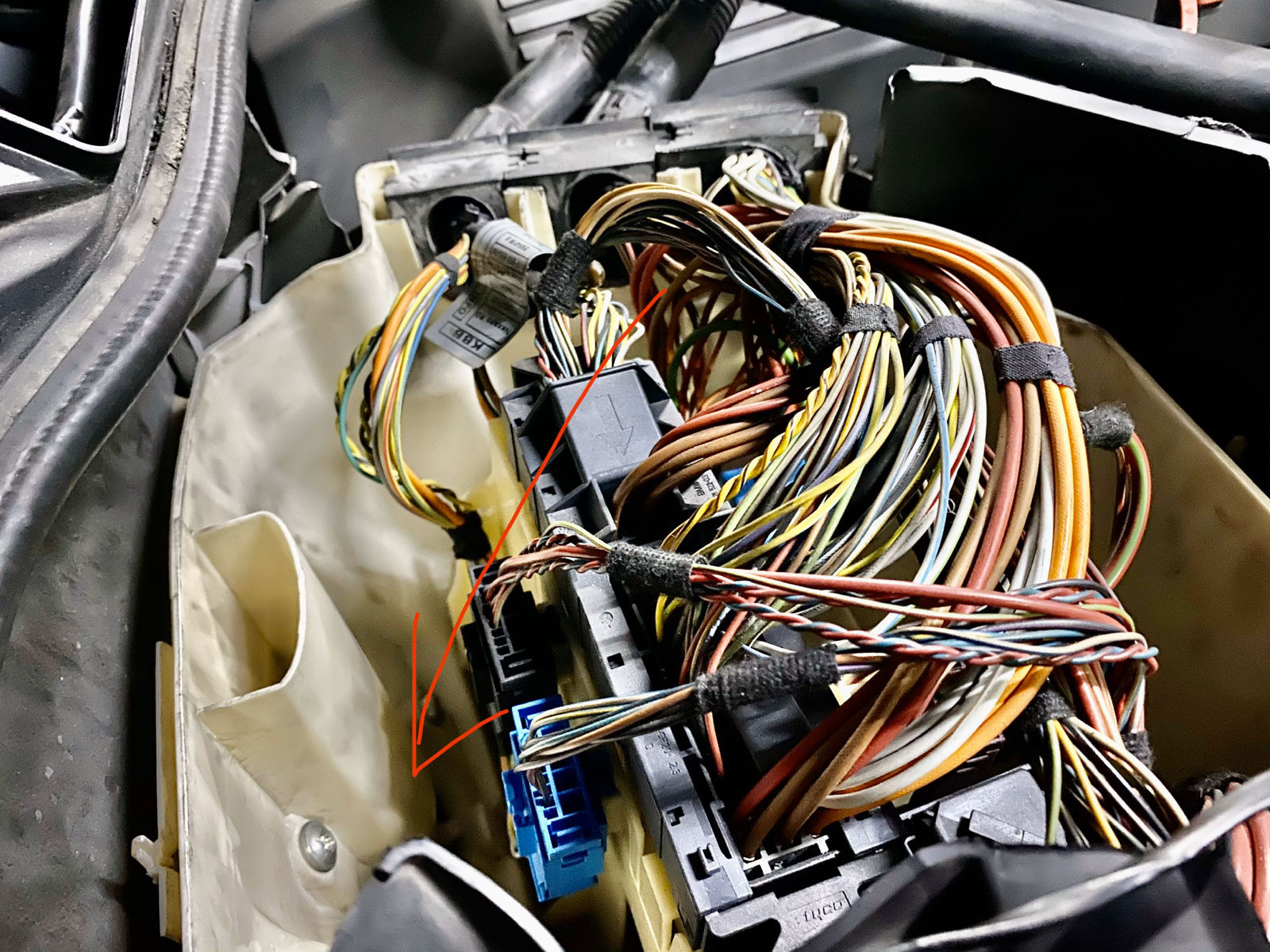
Few quick questions (the firewall access DIY in the main post link is not clear as photos were linked to Photobucket)
1. To run then PDC harness thru firewall is it the small hole shown in my pic below, that I should be using? Do I need to make a hole thru that rubber?
2. How did you route the wire out of the DME box, i read that we need to seal the DME cover properly to avoid any moisture etc. and I dont see any other place to route the harness out of this white box!
Sorry for stupid asks?
I could use a few tips here - I'm waist deep in this project now. I have the bumper removed and holes cut using the punch. That went smoothly and they look excellent.
Are there any tricks to mounting the sensors to the bumper itself? For those of you that have done this - did you mount them while in the brackets? I have some concern that the gaskets will properly land in the holes as test fitting them on sensors without the brackets resulted in a fit that was a bit tight to get the rubber portion to engage fully.
Also, I already have the harness routed to the outside of the DME box. I've removed the DME and carrier, but I'm trying to figure out if there is a way to route the harness through the rubber grommet so I don't compromise the seal of the box itself, or if there needs to be another method employed. Also, once the cable is safely inside the box, will it cleanly feed through to the footwell or do I need to use something to fish it in?
Any pointers are appreciated. I'm eagerly looking forward to having the front end and engine bay back together. Then I can tackle routing the wire to the rear of the car, which should be simple as I've done that before when I installed my rear view camera. I updated the switch panel at that time, as well, so once I get the wiring run inside it should mostly be downhill from here!
Are there any tricks to mounting the sensors to the bumper itself? For those of you that have done this - did you mount them while in the brackets? I have some concern that the gaskets will properly land in the holes as test fitting them on sensors without the brackets resulted in a fit that was a bit tight to get the rubber portion to engage fully.
Also, I already have the harness routed to the outside of the DME box. I've removed the DME and carrier, but I'm trying to figure out if there is a way to route the harness through the rubber grommet so I don't compromise the seal of the box itself, or if there needs to be another method employed. Also, once the cable is safely inside the box, will it cleanly feed through to the footwell or do I need to use something to fish it in?
Any pointers are appreciated. I'm eagerly looking forward to having the front end and engine bay back together. Then I can tackle routing the wire to the rear of the car, which should be simple as I've done that before when I installed my rear view camera. I updated the switch panel at that time, as well, so once I get the wiring run inside it should mostly be downhill from here!
fastersun wroteFrom what I've been told it appears that it can see curbs or parking blocks, but they will "fall off the radar" given the height of the sensors if one gets too close.I've found differing info on this, but mostly for different chassis. Does the E9X front PDC detect curbs?
I'll try to report back once I have my M3 back together and I can speak directly about it.
(Also, in response to my own thread, I haven't found a way to route the wiring into the cabin without modifying something, so I was going to make a hole in the rubber grommet and then seal it back up so the cable goes in with other wiring and doesn't create a spot for moisture to enter the box!)
Got everything put back together today - it worked out great once I coded the PDC and CIC modules.
Looks great along with my retrofit rear view camera!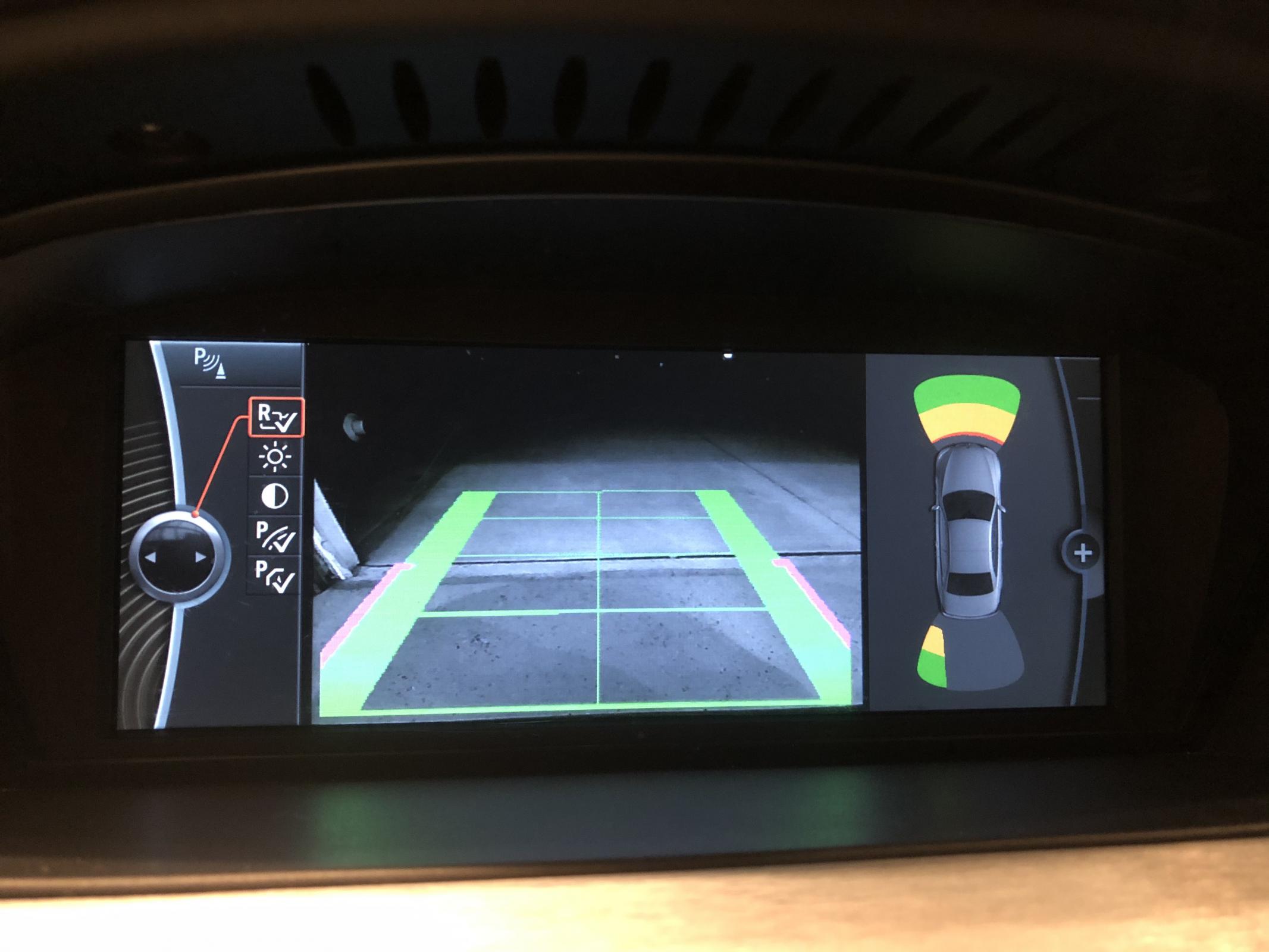
Looks great along with my retrofit rear view camera!
Zap wroteCan you list what you coded? And in what module? I can’t get mine to pull up the screen. And my backup camera doesn’t work.Got everything put back together today - it worked out great once I coded the PDC and CIC modules.
Looks great along with my retrofit rear view camera!
Jewbaaca95 wroteSorry, not on here a ton - so I just saw this.Can you list what you coded? And in what module? I can’t get mine to pull up the screen. And my backup camera doesn’t work.
I modified the VO to remove $507 (Rear PDC) and add $508 (Full PDC). I then default coded both modules. Before doing this I made a backup of the existing coding, as the camera emulator had specific coding that varied from what would default, and I had changed a few CIC values, such as to enable weatherband. I used a Diff utility that displays the changes side by size in the coding files to see exactly what items were modified, and then returned those back to what they were, and the camera worked again.
What is it doing instead of displaying the backup camera? One of the values I had to change for my camera (it may vary by emulator) was to set the PDC Direction to vertical in order for the camera to display. It originally displayed two PDC images instead of the camera. If you default coded and had to have the video input set differently that will also need to be fixed based on what pin your video input hooks to.
For those that have done the front PDC retrofit with a MT, does the front PDC automatically display when moving forward below a certain speed (my wife's i3 does this), or do you have to press the PDC button? And does the PDC continue to display if you shift into neutral and continue to roll forward (e.g.; on a slight downhill slope)?
The reason I ask is that I currently have rear PDC, and when I shift into reverse to back out of my garage, the PDC comes on as expected. But since my driveway is a slight downhill to the street, I typically just shift to neutral and roll down the rest of the way to the street. Of course when I do this, I loose rear PDC.
But what I don't know is if the front PDC works simply by forward motion, or if the transmission must also be in a forward gear. AFAIK, there is only a reverse switch on the transmission (I just replaced it), not a switch for the forward gears, so I don't think there is a way for the front PDC to know.
The reason I ask is that I currently have rear PDC, and when I shift into reverse to back out of my garage, the PDC comes on as expected. But since my driveway is a slight downhill to the street, I typically just shift to neutral and roll down the rest of the way to the street. Of course when I do this, I loose rear PDC.
But what I don't know is if the front PDC works simply by forward motion, or if the transmission must also be in a forward gear. AFAIK, there is only a reverse switch on the transmission (I just replaced it), not a switch for the forward gears, so I don't think there is a way for the front PDC to know.
Thank's for sharing this project with us and i've done everything like u said. Everything is fine exclude of pdc showing thinks reverse. For example a wall being in font of ne but my cic showing this wall is behind me and cic shows thinks front which one actually being behind the car...can anyone help me to solution?
I have followed all the steps but the module doesnt communicate. it shows red on ISTA. I have checked it has power and CANBUS is properly connected. I am using K-CAN cable. Do I need ICOM cable for coding?
Hello, I'm trying to add a front Pdc to my e90, I did them in order.
1. In the FA - Removed $507 and added $508
2. FA_WRITE - CAS
3. FA_WRITE - NFRM
4. SG_Coderien - PDC
5. SG_Coderien -CIC.
but the pdc image does not appear on the cic screen, the pdc and the sounds are working, I could not bring the image to the screen, where am I doing wrong?
1. In the FA - Removed $507 and added $508
2. FA_WRITE - CAS
3. FA_WRITE - NFRM
4. SG_Coderien - PDC
5. SG_Coderien -CIC.
but the pdc image does not appear on the cic screen, the pdc and the sounds are working, I could not bring the image to the screen, where am I doing wrong?
Comment puis-je obtenir la mise à niveau PDC avant pour une BMW E90?
