

There is no shortage of BPMSport tune reviews but I intend to go a little further and cover not only what it's like to drive the car on the street, but also what it's like at the track. In addition, I'll give some insight into the software, cable, and flashing the ECU. Some people I have talked to were unclear about how they would get a tune if they're not local to the tuner. Hopefully this will clarify how easy it is to flash a tune to your car and enjoy the many benefits, regardless of where you live.
First, this is the only tune I've had on the M3 so I can compare only to stock. I am running the Stage I map with raised redline (8,600 rpm), no top speed limiter, and I left the cold start sequence in place (if I get exhaust I'll upgrade to Stage II and delete it).
The Ordering Process
This is really the only criticism I have. The BPMSport website has high level information on the tune but it isn't specific enough. Depending on the review you read, some people say they have "Stage I" or "Stage II" but information about what these are is not on the site, neither is pricing information or details about what comes with the purchase. Originally I had been leaning towards the Evolve tune simply because all the information was available online, I could easily buy it online, and I knew for a fact that it came with the cable and software that would allow me to flash it myself. After reading several BPMSport reviews and talking to people that had it, I decided to get in touch with Mike and discuss the details. After a few conversations I was confident that the tune was what I was looking for; however, the information really should be available online to let people self-serve and research on their own.
The Cable and Software
When my BPMSport package arrived from FedEx, inside was just a cable and a receipt, the way it should be. The cable is built with high quality materials, is plenty long enough, and seems like it will last a long time. Mike sent me the link to download the software along with the 240E update and the tune file (all of which were small files that downloaded quickly and without issue). When I was set-up, I gave Mike a call and he said, "are you ready? Great, let me pull over and we'll get started." He was driving at the time! He didn't let me go to voicemail, he didn't say "oh yeah, uh, I'm out right now can we do this tomorrow?" He literally pulled over in a parking lot and walked me through the whole process from his own car. I'm confident I could have figured it out myself and I wouldn't have minded waiting until the next day, but he made sure I didn't have any problems or experience any delays. I was impressed with and I appreciated the service.
Flashing the DME
After installing the software and drivers, the process to flash was very straightforward. You plug the cable into the car, plug it into your laptop, and launch the software.
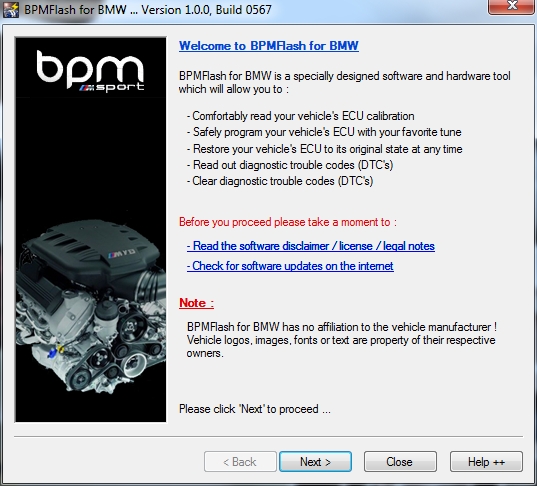
The software does an initial check to make sure your laptop has the resources to perform the tune.
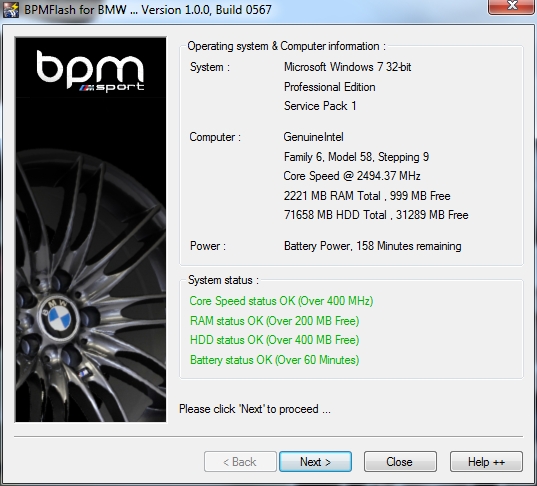
Next the software makes a connection to the ECU in preparation for the flash.
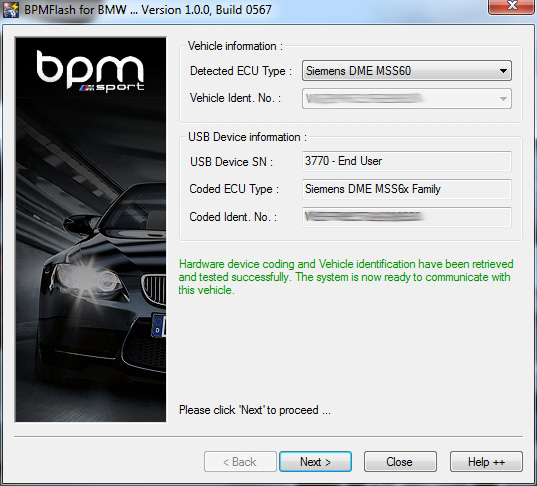
The next screen is the main menu where you can start the flash from but you can also do other things like read and clear error codes using the Read ECU Memory button.
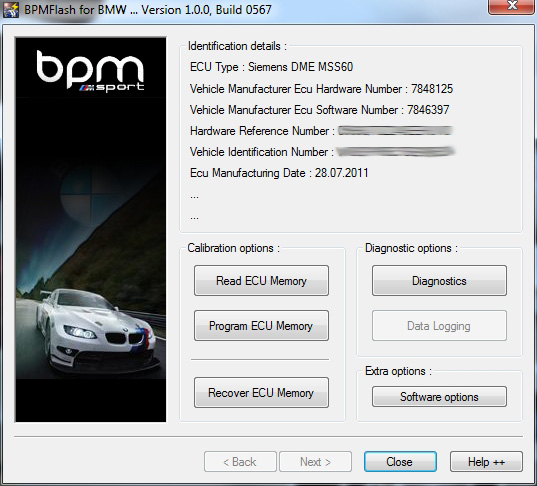
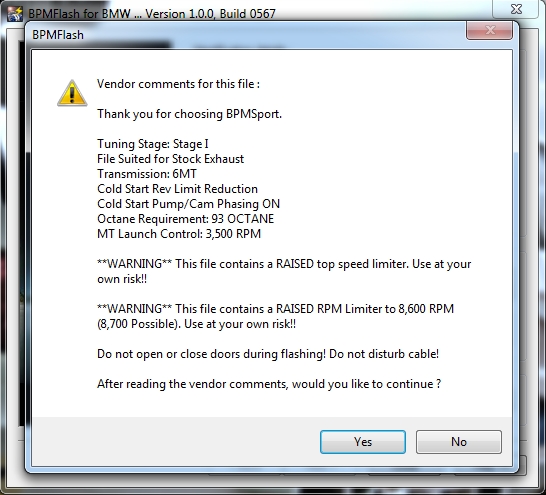
The tune itself is a file you save locally on your hard drive. Once you navigate to it and select it, you get a summary window with the details of your tune. When you click Yes, the flash will start.
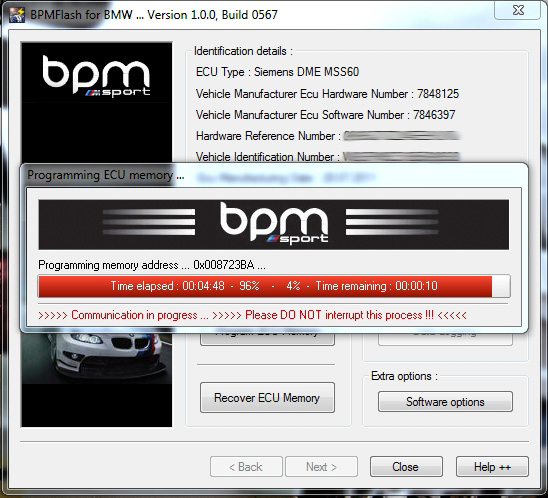
During the flash process, just sit back and relax. As you can see, it will take a little over 5 minutes to complete. Don't open the door, unplug the cable, start the car, etc. All common sense stuff.
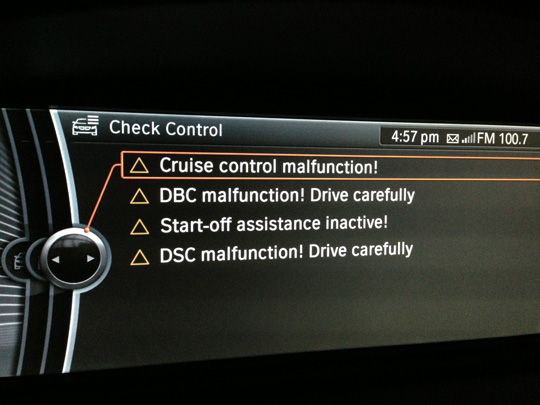
While sitting back and relaxing, you may see different warnings and malfunctions showing up in iDrive and/or the gauge cluster. Don't panic! This is completely normal. During the flash the rest of the car loses contact with the DME and it begins to panic. Once the flash is complete, all warnings will be gone. Trust me, I've flashed mine several times.
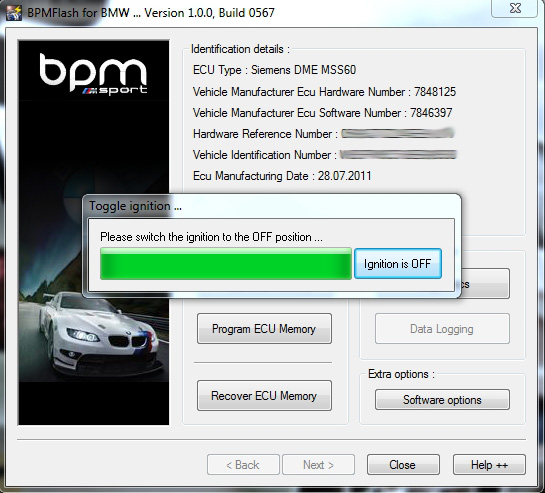
After the flash is complete you'll be instructed to turn off the ignition, then click the button.
When it's all done, you'll see this.
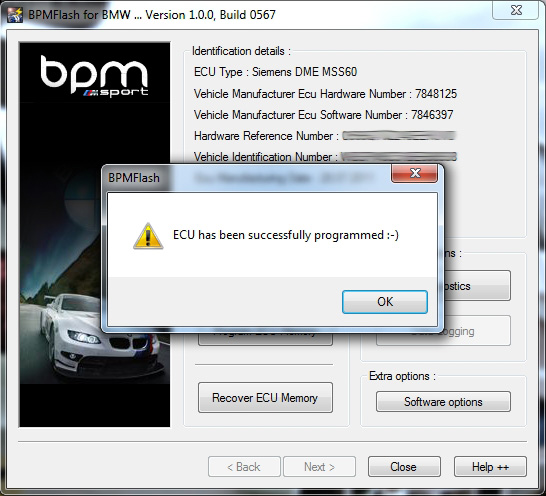
And that's it! The process to flash the ECU is very easy and straight-forward. I did the initial flash at home, flashed it at the track, then in a gas station parking lot on my way home from the track (then again to take these screenshots).
On the Street
I had no complaints about the car in stock form but having past experience in cars with ECU tunes, I knew I wanted something for the M3, and BPMSport delivered. The car is improved in so many different ways. First, the car just seems so much smoother. It's hard to describe in words but it just feels so much more refined. It idles better, it revs more freely and smoothly, and yet at the same time it is more aggressive and has a little more snarl in the induction sound (which I love). The throttle response is greatly improved in all three modes (Normal, Sport, and Sport +). In Normal mode, the response seemed just a little too sluggish but now it is perfect for daily driving. In Sport mode the transition from on throttle to off was too twitchy and I rarely ever touched the Power button. Now it is not only usable but it is excellent. Somehow it's just as quick to respond but that point between on and off has been blurred and it's a much smoother transition. Again, it's hard to explain but you definitely feel it.
In terms of power, there is a noticeable improvement in low end torque. I feel it just driving around town and don't feel the need to downshift as often (plus I love the extra growl you get when you accelerate from low rpm). I didn't have a complaint about torque in the past but the little extra grunt makes the driving experience around town easier and more enjoyable. I don't drive very aggressively on the street but there is a noticeable improvement in drive-ability and I can't imagine going back. This alone makes the tune worth it but at the track...
At the Track
A few weeks ago I had the car at the track and this is where the tune really shines and where you see the combination of enhancements really come together. The best example are those turns you come out of at an rpm that's a little lower than you'd like to be at but a little higher than is necessary for dropping it into second (at an HPDE anyway). Now I can roll onto the throttle and the low end improvement in torque pulls me through with more force than it ever had. I no longer feel like a lower gear is necessary (in this specific situation). Once at WOT the car screams towards it's new 8,600 rpm redline faster and with more eagerness than before. It feels like it wants to keep on revving right past the redline. Getting out of the corner faster, the improvement in top end power, and the increased redline all result in a higher end of straight speed. It really is a very different experience after the tune.
To top it off, I can now do all of this with the throttle in Sport (haven't tried Sport+ much yet) and the increased throttle response makes it feel that much better.
For the track event, Mike was kind enough to prepare a map for me tuned for 98 octane, which was available at the pump right at the track. It was my intention do do a couple of sessions on the stock map, then finish the first day on the Stage 1 map. On the second day I planned to use the 98 octane map the whole day. Unfortunately the weather was not on my side and I didn't get to do that. It was very cold and rainy the first so I just stuck with Stage I. On day 2 I filled up with 98 and flashed the more aggressive map. Though it was sunny and warmer, the track was still wet until around lunchtime forcing me to start out slowly. By my last session the track was dry and I was able to really push it. It drove better and pulled harder than it ever had and I didn't want to exit the track. Though not the kind of comparison I wanted to do, there was a noticeable improvement going from Stage I to the 98 octane map. I can't imagine it getting any better but I still have stock exhaust. I want exhaust more than ever so that I can upgrade to Stage II.
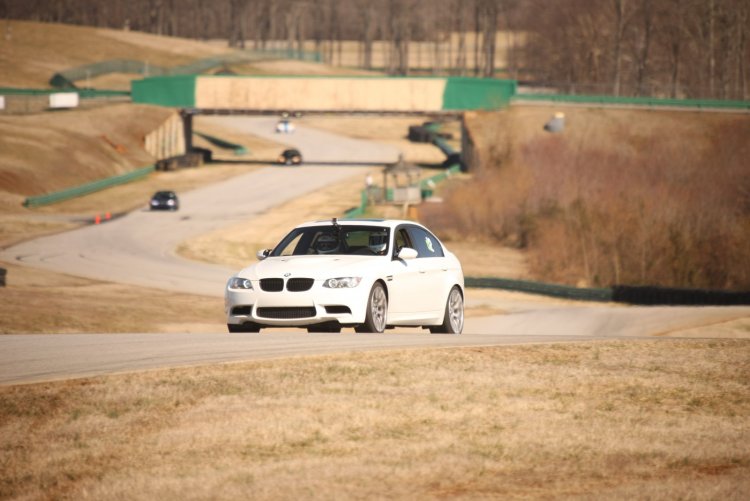
A tune really is difficult to describe but I think this picture pretty much sums it up. Just look how far ahead of everyone I am!
Summary
As I said at the beginning, this is the only tune I've had on the M3. I don't have any comparisons other than to stock. There are several options out there for tunes and I can't say that this one is better than any other, but I can tell you that the only regret I have is not doing it sooner. Overall I'm completely satisfied with the tune, the software, the cable and the service. Getting to know Mike during the process has been great as well. He really is passionate about what he does and really goes the extra mile to make sure his customers are happy.
If you're on the fence about whether or not to get a tune, regardless of which one, do it. A tune is a must-do regardless of the other mods you have and once you have it, you'll never want to go back to stock. If you're trying to decide which tune to go with, I say that BPMSport is an excellent choice and you won't be disappointed.
First, this is the only tune I've had on the M3 so I can compare only to stock. I am running the Stage I map with raised redline (8,600 rpm), no top speed limiter, and I left the cold start sequence in place (if I get exhaust I'll upgrade to Stage II and delete it).
The Ordering Process
This is really the only criticism I have. The BPMSport website has high level information on the tune but it isn't specific enough. Depending on the review you read, some people say they have "Stage I" or "Stage II" but information about what these are is not on the site, neither is pricing information or details about what comes with the purchase. Originally I had been leaning towards the Evolve tune simply because all the information was available online, I could easily buy it online, and I knew for a fact that it came with the cable and software that would allow me to flash it myself. After reading several BPMSport reviews and talking to people that had it, I decided to get in touch with Mike and discuss the details. After a few conversations I was confident that the tune was what I was looking for; however, the information really should be available online to let people self-serve and research on their own.
The Cable and Software
When my BPMSport package arrived from FedEx, inside was just a cable and a receipt, the way it should be. The cable is built with high quality materials, is plenty long enough, and seems like it will last a long time. Mike sent me the link to download the software along with the 240E update and the tune file (all of which were small files that downloaded quickly and without issue). When I was set-up, I gave Mike a call and he said, "are you ready? Great, let me pull over and we'll get started." He was driving at the time! He didn't let me go to voicemail, he didn't say "oh yeah, uh, I'm out right now can we do this tomorrow?" He literally pulled over in a parking lot and walked me through the whole process from his own car. I'm confident I could have figured it out myself and I wouldn't have minded waiting until the next day, but he made sure I didn't have any problems or experience any delays. I was impressed with and I appreciated the service.
Flashing the DME
After installing the software and drivers, the process to flash was very straightforward. You plug the cable into the car, plug it into your laptop, and launch the software.
The software does an initial check to make sure your laptop has the resources to perform the tune.
Next the software makes a connection to the ECU in preparation for the flash.
The next screen is the main menu where you can start the flash from but you can also do other things like read and clear error codes using the Read ECU Memory button.
The tune itself is a file you save locally on your hard drive. Once you navigate to it and select it, you get a summary window with the details of your tune. When you click Yes, the flash will start.
During the flash process, just sit back and relax. As you can see, it will take a little over 5 minutes to complete. Don't open the door, unplug the cable, start the car, etc. All common sense stuff.
While sitting back and relaxing, you may see different warnings and malfunctions showing up in iDrive and/or the gauge cluster. Don't panic! This is completely normal. During the flash the rest of the car loses contact with the DME and it begins to panic. Once the flash is complete, all warnings will be gone. Trust me, I've flashed mine several times.
After the flash is complete you'll be instructed to turn off the ignition, then click the button.
When it's all done, you'll see this.
And that's it! The process to flash the ECU is very easy and straight-forward. I did the initial flash at home, flashed it at the track, then in a gas station parking lot on my way home from the track (then again to take these screenshots).
On the Street
I had no complaints about the car in stock form but having past experience in cars with ECU tunes, I knew I wanted something for the M3, and BPMSport delivered. The car is improved in so many different ways. First, the car just seems so much smoother. It's hard to describe in words but it just feels so much more refined. It idles better, it revs more freely and smoothly, and yet at the same time it is more aggressive and has a little more snarl in the induction sound (which I love). The throttle response is greatly improved in all three modes (Normal, Sport, and Sport +). In Normal mode, the response seemed just a little too sluggish but now it is perfect for daily driving. In Sport mode the transition from on throttle to off was too twitchy and I rarely ever touched the Power button. Now it is not only usable but it is excellent. Somehow it's just as quick to respond but that point between on and off has been blurred and it's a much smoother transition. Again, it's hard to explain but you definitely feel it.
In terms of power, there is a noticeable improvement in low end torque. I feel it just driving around town and don't feel the need to downshift as often (plus I love the extra growl you get when you accelerate from low rpm). I didn't have a complaint about torque in the past but the little extra grunt makes the driving experience around town easier and more enjoyable. I don't drive very aggressively on the street but there is a noticeable improvement in drive-ability and I can't imagine going back. This alone makes the tune worth it but at the track...
At the Track
A few weeks ago I had the car at the track and this is where the tune really shines and where you see the combination of enhancements really come together. The best example are those turns you come out of at an rpm that's a little lower than you'd like to be at but a little higher than is necessary for dropping it into second (at an HPDE anyway). Now I can roll onto the throttle and the low end improvement in torque pulls me through with more force than it ever had. I no longer feel like a lower gear is necessary (in this specific situation). Once at WOT the car screams towards it's new 8,600 rpm redline faster and with more eagerness than before. It feels like it wants to keep on revving right past the redline. Getting out of the corner faster, the improvement in top end power, and the increased redline all result in a higher end of straight speed. It really is a very different experience after the tune.
To top it off, I can now do all of this with the throttle in Sport (haven't tried Sport+ much yet) and the increased throttle response makes it feel that much better.
For the track event, Mike was kind enough to prepare a map for me tuned for 98 octane, which was available at the pump right at the track. It was my intention do do a couple of sessions on the stock map, then finish the first day on the Stage 1 map. On the second day I planned to use the 98 octane map the whole day. Unfortunately the weather was not on my side and I didn't get to do that. It was very cold and rainy the first so I just stuck with Stage I. On day 2 I filled up with 98 and flashed the more aggressive map. Though it was sunny and warmer, the track was still wet until around lunchtime forcing me to start out slowly. By my last session the track was dry and I was able to really push it. It drove better and pulled harder than it ever had and I didn't want to exit the track. Though not the kind of comparison I wanted to do, there was a noticeable improvement going from Stage I to the 98 octane map. I can't imagine it getting any better but I still have stock exhaust. I want exhaust more than ever so that I can upgrade to Stage II.
A tune really is difficult to describe but I think this picture pretty much sums it up. Just look how far ahead of everyone I am!
Summary
As I said at the beginning, this is the only tune I've had on the M3. I don't have any comparisons other than to stock. There are several options out there for tunes and I can't say that this one is better than any other, but I can tell you that the only regret I have is not doing it sooner. Overall I'm completely satisfied with the tune, the software, the cable and the service. Getting to know Mike during the process has been great as well. He really is passionate about what he does and really goes the extra mile to make sure his customers are happy.
If you're on the fence about whether or not to get a tune, regardless of which one, do it. A tune is a must-do regardless of the other mods you have and once you have it, you'll never want to go back to stock. If you're trying to decide which tune to go with, I say that BPMSport is an excellent choice and you won't be disappointed.


