

Does anyone have an idea of why choose one over the other? Carsara or Andream or any other brand on Alliexpress? Plus and Cons?
624.6KVIEWS
737REPLIES
132APPRECIATES
06-05-2025LAST POST
Cyberdemon wroteThanks for this, I played around with my audio setting and am a bit happier with how it sounds now, although I think it's still not as good as audio via bluetooth on the original system. Might be user error or just a small price to play for the convenience that this whole system adds.My audio settings are Aux Input ~75%, Carsara @ 13, EQ is pretty heavily tweaked for my ears. It's a bit of the pain in the ass because you need to dial in the EQ on the iDrive to sound good first, then once you're happy with that, go adjust the EQ on the Carsara. Might take you a half hour of playing with different genres that you like to listen to but once it's dialed in you should be pretty close.
If you're getting static or a hiss it usually means the volume on the iDrive is very high and the source output from the carsara is too low.

bugg wroteI did not, however depends on feed you have. In any event ensure its properly grounded.Anyone know if we need a separate relay assembly for a front camera?
Brasilcat wroteThe majority of these units are the same basic hardware with slight variations. The Carsara unit I recommend in this thread is specifically based on the hundreds of other posts in the general Carplay thread. It seems to have the best combination of software features, OEM mic integration, etc for the price point.Does anyone have an idea of why choose one over the other? Carsara or Andream or any other brand on Alliexpress? Plus and Cons?
eddiegordo wroteIt'll never sound as good as bluetooth which is a true digital signal coming into your head unit. So yeah, it's the price to pay for the convenience unfortunately.Thanks for this, I played around with my audio setting and am a bit happier with how it sounds now, although I think it's still not as good as audio via bluetooth on the original system. Might be user error or just a small price to play for the convenience that this whole system adds.
I had everything running, but now the mic stopped working. I checked the wires as they appear fine but I can’t explain this behaviour:
1 using cic mic with cic works without carsara harness
2 using carsara harness means this same mic no longer works in CarPlay or in CIC
3 tried external mic on harness also doesn’t work
My only explanation is that the cable I ran up the a pillar is now broken internally
1 using cic mic with cic works without carsara harness
2 using carsara harness means this same mic no longer works in CarPlay or in CIC
3 tried external mic on harness also doesn’t work
My only explanation is that the cable I ran up the a pillar is now broken internally
Cyberdemon wroteGotcha. Thanks for the clarification. I went ahead and threw together a quick (but ugly) relay assembly for my rear camera as reading through this thread made me think a relay was a necessity. Upside is that my rearview camera works perfectly right now.You only need a relay if your camera suffers from voltage issues. Easiest way to tell would be to test wire it before the full installation. Not too many have done the front camera on this car.
Putting off the front camera install for another day though. My car came with a GT4 lip which I'm on the fence about, but a front camera would help loads with maneuvering a huge lip like that.
Hello everyone! I am most of the way through the installation process and have been testing every step of the way. I noticed now that I am no longer getting audio from the Carsara unit. I still get audio from the CIC and I was getting audio from Carsara yesterday... do you all have any ideas on what it could be? I did the coding so the aux signal is going through the quadlock connector. Aux volume is also at 50%.
EDIT: I just went back to the car after letting it sit with the battery connected, but powered off for 20 minutes or so and now everything is working... maybe it just needed a reboot or something.
EDIT: I just went back to the car after letting it sit with the battery connected, but powered off for 20 minutes or so and now everything is working... maybe it just needed a reboot or something.
Sounds like something is loose. Best also doublecheck coding before you put everything back together.
Zarraya wroteDigging more into it, it seems like it is a CarPlay issue. There is no audio for music until I reconnect, but phone and Siri functions are normal.Hello everyone! I am most of the way through the installation process and have been testing every step of the way. I noticed now that I am no longer getting audio from the Carsara unit. I still get audio from the CIC and I was getting audio from Carsara yesterday... do you all have any ideas on what it could be? I did the coding so the aux signal is going through the quadlock connector. Aux volume is also at 50%.
EDIT: I just went back to the car after letting it sit with the battery connected, but powered off for 20 minutes or so and now everything is working... maybe it just needed a reboot or something.
EDIT: Turns out I am just an idiot. I still had my phone connected to the CIC bluetooth system. So the audio for music was routed through that. I unpaired the phone from the car and it seems to be working now.
Anyone here with front and rear PDC?
When I engage reverse the screen switches to the original iDrive parking sensors screen where it shows the graph on how far from an object I am. It works fine for reverse but once I engage D again to move forward while still parking, it switches back to the carsara screen instead of keeping it in the iDrive screen. I hope I made sense...
I looked around to see if there was any obvious setting to change so that it keeps the iDrive screen while both rear and front parking sensors are active but couldn't find anything. Any ideas?
When I engage reverse the screen switches to the original iDrive parking sensors screen where it shows the graph on how far from an object I am. It works fine for reverse but once I engage D again to move forward while still parking, it switches back to the carsara screen instead of keeping it in the iDrive screen. I hope I made sense...
I looked around to see if there was any obvious setting to change so that it keeps the iDrive screen while both rear and front parking sensors are active but couldn't find anything. Any ideas?
Having an issue with red screen for iDrive with CarPlay working, or iDrive works with no CarPlay output. Below is various info on my setup and what I've tried.
AIOCOAI CarPlay box from aliexpress (not Carsara, but looks identical)
2013 M3
Car is coded per original post and shows AUX front in iDrive.
Dip switches 3/4 on (matches 8.8" screen in AIOCOAI instructions as well)
B# head unit -> A# low speed can, click wheel controller works fine.
B# head unit -> L# high speed can, click wheel controller also works fine.
D# jumper is removed, and the extra iDrive cable is removed.
CarPlay Box LVDS OUT -> pink cable in my dash. (tried with and without extension)
Carplay Box LVDS IN -> extended cable into the pink connector on my radio.
In this configuration I get a red screen when the car powers up. If I hold the menu button for 3 seconds I get the CarPlay box menu system.
I also tried reversing the cables as below:
CarPlay Box LVDS OUT -> extended cable into the pink connector on my radio.
Carplay Box LVDS IN -> pink cable in my dash. (tried with and without extension)
In this configuration I get the iDrive menu as normal. Hold menu button, the click wheel is now controlling my CarPlay box, but I still see the iDrive which appears unresponsive. Holding menu returns controls to my iDrive screen.
What am I doing wrong with these cables?
AIOCOAI CarPlay box from aliexpress (not Carsara, but looks identical)
2013 M3
Car is coded per original post and shows AUX front in iDrive.
Dip switches 3/4 on (matches 8.8" screen in AIOCOAI instructions as well)
B# head unit -> A# low speed can, click wheel controller works fine.
B# head unit -> L# high speed can, click wheel controller also works fine.
D# jumper is removed, and the extra iDrive cable is removed.
CarPlay Box LVDS OUT -> pink cable in my dash. (tried with and without extension)
Carplay Box LVDS IN -> extended cable into the pink connector on my radio.
In this configuration I get a red screen when the car powers up. If I hold the menu button for 3 seconds I get the CarPlay box menu system.
I also tried reversing the cables as below:
CarPlay Box LVDS OUT -> extended cable into the pink connector on my radio.
Carplay Box LVDS IN -> pink cable in my dash. (tried with and without extension)
In this configuration I get the iDrive menu as normal. Hold menu button, the click wheel is now controlling my CarPlay box, but I still see the iDrive which appears unresponsive. Holding menu returns controls to my iDrive screen.
What am I doing wrong with these cables?
strobe89 wroteRed screen is indicative of a bad LVDS connection. Try connecting with the CIC unit out of the dash and check the video to confirm your in and out are correct. (Out should go to LCD, In should go to CIC IIRC)Having an issue with red screen for iDrive with CarPlay working, or iDrive works with no CarPlay output. Below is various info on my setup and what I've tried.
AIOCOAI CarPlay box from aliexpress (not Carsara, but looks identical)
2013 M3
Car is coded per original post and shows AUX front in iDrive.
Dip switches 3/4 on (matches 8.8" screen in AIOCOAI instructions as well)
B# head unit -> A# low speed can, click wheel controller works fine.
B# head unit -> L# high speed can, click wheel controller also works fine.
D# jumper is removed, and the extra iDrive cable is removed.
CarPlay Box LVDS OUT -> pink cable in my dash. (tried with and without extension)
Carplay Box LVDS IN -> extended cable into the pink connector on my radio.
In this configuration I get a red screen when the car powers up. If I hold the menu button for 3 seconds I get the CarPlay box menu system.
I also tried reversing the cables as below:
CarPlay Box LVDS OUT -> extended cable into the pink connector on my radio.
Carplay Box LVDS IN -> pink cable in my dash. (tried with and without extension)
In this configuration I get the iDrive menu as normal. Hold menu button, the click wheel is now controlling my CarPlay box, but I still see the iDrive which appears unresponsive. Holding menu returns controls to my iDrive screen.
What am I doing wrong with these cables?
Make sure they weren't getting pinched anywhere and that there's no damage to the cable if the head unit was forced back.
Cyberdemon wroteThat is what I thought as well. I have been doing all of this testing out of the dash with everything sitting right by the shift knob. I can literally swap cables in seconds between the 2 test cases I mentioned where I get either iDrive or CarPlay. Can't seem to get both working at the same time. Almost wondering if my CarPlay box is a dud. As in maybe it can't pass through my iDrive output correctly.Red screen is indicative of a bad LVDS connection. Try connecting with the CIC unit out of the dash and check the video to confirm your in and out are correct. (Out should go to LCD, In should go to CIC IIRC)
Make sure they weren't getting pinched anywhere and that there's no damage to the cable if the head unit was forced back.
When it is connected as you say (in to CIC, out to display) is when I get the red screen for iDrive and the CarPlay works fine. That is the correct connection path from what I've seen on here.
Finished my install last week and all is good, but I opted to use the AUX instead of coding the CIC.
Has anyone coded the CIC after the fact to use audio through the quadlock? I hear a faint buzz or white noise when using the AUX and playing music, more so if it is paused.
If I have to revert to "no CarPlay" to code it, is it just a matter of plugging in only the OEM quadlock to the radio or do I have to unplug everything else from the Carsara box and replug into the radio?
Has anyone coded the CIC after the fact to use audio through the quadlock? I hear a faint buzz or white noise when using the AUX and playing music, more so if it is paused.
If I have to revert to "no CarPlay" to code it, is it just a matter of plugging in only the OEM quadlock to the radio or do I have to unplug everything else from the Carsara box and replug into the radio?
I got a response from the AIOCOAI vendor on aliexpress about my red screen issue: "For red screen. it is because the idrive knob is not installed corretly. Please check below manual first. sir."
Do I really need to have the cable connected for the iDrive knob in order to fix a screen issue? The knob works fine in both my test cases, just trying to fix the red screen issue.
Also, as a side note, I've tried putting the box behind where the HVAC controls are. It won't push back in nearly enough. Doesn't seem like my car has enough room right there. Not even a cable snag issue, just too tight of an opening.
Connection diagram in the user manual they provided me is attached. (it came with no manual in the box or links until I mentioned this)

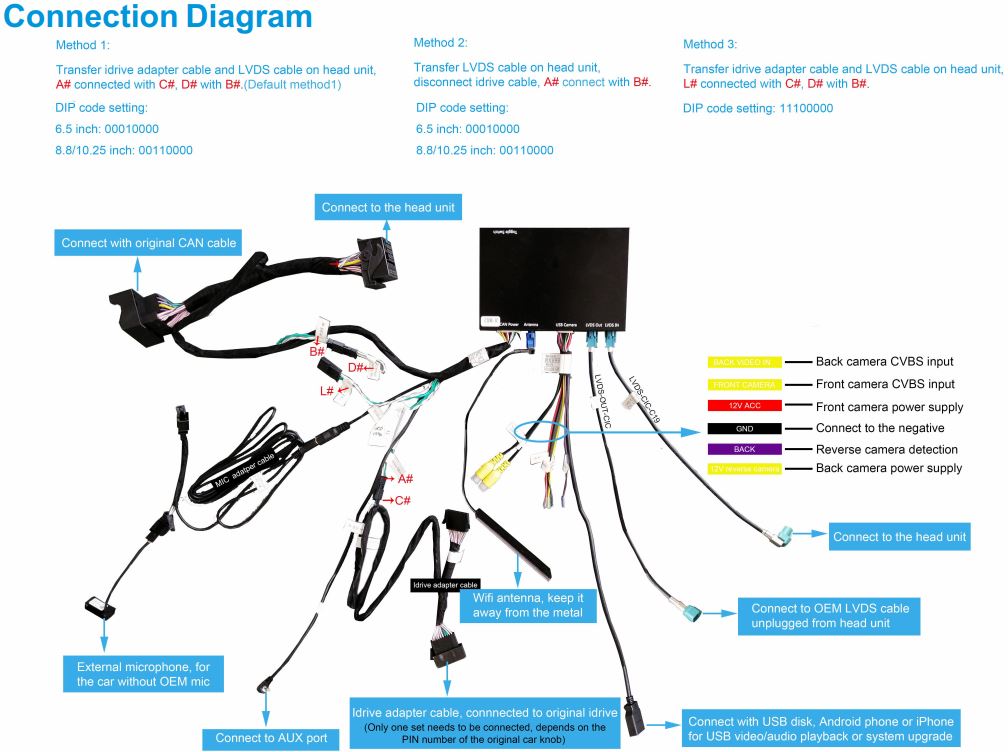
Do I really need to have the cable connected for the iDrive knob in order to fix a screen issue? The knob works fine in both my test cases, just trying to fix the red screen issue.
Also, as a side note, I've tried putting the box behind where the HVAC controls are. It won't push back in nearly enough. Doesn't seem like my car has enough room right there. Not even a cable snag issue, just too tight of an opening.
Connection diagram in the user manual they provided me is attached. (it came with no manual in the box or links until I mentioned this)
strobe89 wroteJust for amusement and out of frustration, I tried the method 1 and 3 using the iDrive knob cable. Both options wouldn't work at all, stuck at red screen and holding menu wouldn't respond to bring up CarPlay. Switched back to method 2 which everyone else on here was using and still get my red screen, but holding menu will bring up CarPlay as expected. Had a slight heart attack for a minute while the car freaked out, forgot I left dip switches 1/2/3 on for method 3. Switched back to 3/4 only and it was back to my usual red screen issue.I got a response from the AIOCOAI vendor on aliexpress about my red screen issue: "For red screen. it is because the idrive knob is not installed corretly. Please check below manual first. sir."
Do I really need to have the cable connected for the iDrive knob in order to fix a screen issue? The knob works fine in both my test cases, just trying to fix the red screen issue.
Also, as a side note, I've tried putting the box behind where the HVAC controls are. It won't push back in nearly enough. Doesn't seem like my car has enough room right there. Not even a cable snag issue, just too tight of an opening.
Connection diagram in the user manual they provided me is attached. (it came with no manual in the box or links until I mentioned this)
I swapped the video cables in and outs again and set button 6 on the radio to AUX front, then swapped my video cables back. I'm really tempted to just deal with the red screen and exclusively use CarPlay. I basically have no use for iDrive except setting the time and DSP settings for the individual audio. At this point I'm pretty fed up with the car. I had the CarPlay box in and working in 2-3 hours on my F30.
I'm starting to think the CarPlay box itself is broken/wired wrong internally, because with flipped in/out cables I shouldn't be getting ANYTHING on my screen. Instead when they are backwards I get iDrive on the screen. Doesn't make sense to me how that even happens.
strobe89 wroteSounds like you have a faulty wiring harness. I had similar issues with another CarPlay box and they made me go through various troubleshooting steps like you have done. Once they got the unit back it was determined to be a bad wiring loom.strobe89 wroteJust for amusement and out of frustration, I tried the method 1 and 3 using the iDrive knob cable. Both options wouldn't work at all, stuck at red screen and holding menu wouldn't respond to bring up CarPlay. Switched back to method 2 which everyone else on here was using and still get my red screen, but holding menu will bring up CarPlay as expected. Had a slight heart attack for a minute while the car freaked out, forgot I left dip switches 1/2/3 on for method 3. Switched back to 3/4 only and it was back to my usual red screen issue.I got a response from the AIOCOAI vendor on aliexpress about my red screen issue: "For red screen. it is because the idrive knob is not installed corretly. Please check below manual first. sir."
Do I really need to have the cable connected for the iDrive knob in order to fix a screen issue? The knob works fine in both my test cases, just trying to fix the red screen issue.
Also, as a side note, I've tried putting the box behind where the HVAC controls are. It won't push back in nearly enough. Doesn't seem like my car has enough room right there. Not even a cable snag issue, just too tight of an opening.
Connection diagram in the user manual they provided me is attached. (it came with no manual in the box or links until I mentioned this)
I swapped the video cables in and outs again and set button 6 on the radio to AUX front, then swapped my video cables back. I'm really tempted to just deal with the red screen and exclusively use CarPlay. I basically have no use for iDrive except setting the time and DSP settings for the individual audio. At this point I'm pretty fed up with the car. I had the CarPlay box in and working in 2-3 hours on my F30.
I'm starting to think the CarPlay box itself is broken/wired wrong internally, because with flipped in/out cables I shouldn't be getting ANYTHING on my screen. Instead when they are backwards I get iDrive on the screen. Doesn't make sense to me how that even happens.
bighindu79 wroteSigh, hopefully the vendor gets back with me and can send me a new unit. Not looking forward to shipping it back to China, hopefully they pay to send it back!Sounds like you have a faulty wiring harness. I had similar issues with another CarPlay box and they made me go through various troubleshooting steps like you have done. Once they got the unit back it was determined to be a bad wiring loom.
I buttoned up the car and everything works great (minus iDrive red screen). I ended up putting the box to the right of the CIC unit as it wouldn't fit where the bimmertech video shows. Same place it went in my F30.
Audio sounds great through the quadlock connector, using just 1 click past 75% on AUX front volume or else I get a bit too much hiss from having to crank up the volume too much to get to my usual music volume. Also turned the music slider up in the CarPlay box menu system. I got pretty good at swapping those video cables to adjust iDrive settings then back again for CarPlay, if only it had worked as intended...
I'd say it sounds 'good enough', but just a step down from the same vendors CarPlay box on my H/K system in my F30. My F30 with CarPlay sounds damn near CD quality with Pandora premium. I do feel like the individual audio in the E92 M doesn't sound as good as my F30 on any source I tested though though. The bass is better in the E92 M, but sound stage and overall perceived quality on the F30 seems better. Could just be settings differences. I fiddled with both cars for a while until I settled on something I liked. I listen to music a lot less in the E92 M anyway since I tend to have the windows down listening to that glorious V8 my F30 lacks.
Set my box to aftermarket camera, and the backup camera works like a charm. I'm using the "LIEBMAYA 170 Degree Car Trunk Handle Backup Camera" on Amazon, picture seems nice and clear. I did turn off the lines from the box and camera itself as they seem way off as expected. Quality of the picture is not bad at all, although does seem aimed a tad lower than the F30 OEM camera. Does the job, no real complaints especially for the price.
Overall I'm still frustrated that it seems I got some faulty hardware/wiring from the vendor. I will update this thread when I hear back and/or have a resolution from them.
strobe89 wroteGood luck! Just FYI, I had to pay for shipping back to China. They did not reimburse me for the shipping even though it was a quality control issue on their end.bighindu79 wroteSigh, hopefully the vendor gets back with me and can send me a new unit. Not looking forward to shipping it back to China, hopefully they pay to send it back!Sounds like you have a faulty wiring harness. I had similar issues with another CarPlay box and they made me go through various troubleshooting steps like you have done. Once they got the unit back it was determined to be a bad wiring loom.
I buttoned up the car and everything works great (minus iDrive red screen). I ended up putting the box to the right of the CIC unit as it wouldn't fit where the bimmertech video shows. Same place it went in my F30.
Audio sounds great through the quadlock connector, using just 1 click past 75% on AUX front volume or else I get a bit too much hiss from having to crank up the volume too much to get to my usual music volume. Also turned the music slider up in the CarPlay box menu system. I got pretty good at swapping those video cables to adjust iDrive settings then back again for CarPlay, if only it had worked as intended...
I'd say it sounds 'good enough', but just a step down from the same vendors CarPlay box on my H/K system in my F30. My F30 with CarPlay sounds damn near CD quality with Pandora premium. I do feel like the individual audio in the E92 M doesn't sound as good as my F30 on any source I tested though though. The bass is better in the E92 M, but sound stage and overall perceived quality on the F30 seems better. Could just be settings differences. I fiddled with both cars for a while until I settled on something I liked. I listen to music a lot less in the E92 M anyway since I tend to have the windows down listening to that glorious V8 my F30 lacks.
Set my box to aftermarket camera, and the backup camera works like a charm. I'm using the "LIEBMAYA 170 Degree Car Trunk Handle Backup Camera" on Amazon, picture seems nice and clear. I did turn off the lines from the box and camera itself as they seem way off as expected. Quality of the picture is not bad at all, although does seem aimed a tad lower than the F30 OEM camera. Does the job, no real complaints especially for the price.
Overall I'm still frustrated that it seems I got some faulty hardware/wiring from the vendor. I will update this thread when I hear back and/or have a resolution from them.
strobe89 wroteJust to be clear, you connected
Overall I'm still frustrated that it seems I got some faulty hardware/wiring from the vendor. I will update this thread when I hear back and/or have a resolution from them.
* LVDS OUTPUT on the unit into the pink LVDS you removed from the CIC head unit (blue and pink for the ocd, you can tape this up too) and
* LVDS IN on the unit into the PINK LVDS input on the CIC head unit.
Ensure all connectors click in properly...else likely dodgy wiring harness
Good Luck!!
m3toboot wroteYep, that is how I have it connected and get the red screen for iDrive, but CarPlay works fine when I hold menu. I even tried without the extension on the LVDS output, no change. All connections click in.Just to be clear, you connected
* LVDS OUTPUT on the unit into the pink LVDS you removed from the CIC head unit (blue and pink for the ocd, you can tape this up too) and
* LVDS IN on the unit into the PINK LVDS input on the CIC head unit.
Ensure all connectors click in properly...else likely dodgy wiring harness
Good Luck!!
strobe89 wroteTo be clear there is NO output on the screen apart from when you hold menu and go to carplay? You cannot see any of the idrive menus? When carplay is working, what happens when you drop back into idrive/bmw ? Backt to RED screen?Yep, that is how I have it connected and get the red screen for iDrive, but CarPlay works fine when I hold menu. I even tried without the extension on the LVDS output, no change. All connections click in.
Can you verify if original idrive display/work by going back to original setup? Remove quadlock/harness and move LVDS back to CIC screen.
If this works, then you know for sure its the addition. ie harness/carplay unit.
As always, disconnect battery before doing anything and remember to cover the boot lock with a towel or similar.
