624.4KVIEWS
737REPLIES
132APPRECIATES
06-05-2025LAST POST
m3toboot wrote
To be clear there is NO output on the screen apart from when you hold menu and go to carplay? You cannot see any of the idrive menus? When carplay is working, what happens when you drop back into idrive/bmw ? Backt to RED screen?

Can you verify if original idrive display/work by going back to original setup? Remove quadlock/harness and move LVDS back to CIC screen.

If this works, then you know for sure its the addition. ie harness/carplay unit.

As always, disconnect battery before doing anything and remember to cover the boot lock with a towel or similar.
I get red screen on boot (iDrive), and have to wait until CarPlay auto connects and switches input or manually holy Menu to get CarPlay to show. No iDrive menus function when the CarPlay box is plugged in correctly. Switching back at any point means red screen. Video below to demonstrate.

Original iDrive works fine when I swap the LVDS cable back, nothing wrong with it.

I always disconnected the battery when I was testing, but I did swap LVDS cables most recently to set the time on iDrive to get rid of the no time set ! warning on my cluster and then back to CarPlay wiring again. So, for now I'm driving around with CarPlay working, but no iDrive. Had to do that last swap with the battery connected though as to not lose time again. Didn't seem to have any ill affects moving just the LVDS cable with the battery connected.
You can get a red screen if idrive control knob isn't connected or if one of the other can bus modules is powered off. I've seen it come and go, so it's not just a symptom of bad LVDS connection but there are there causes as well.
The-Traveler wrote
You can get a red screen if idrive control knob isn't connected or if one of the other can bus modules is powered off. I've seen it come and go, so it's not just a symptom of bad LVDS connection but there are there causes as well.
That is what the vendor was telling me on aliexpress originally. However using their iDrive controller cable and the D# jumper makes the iDrive knob totally unresponsive and I get stuck on my red screen with no way to get to CarPlay.

The vendor had me send them a video of it not working, and now they want me to take it all apart again so they can see the connection path. I'm not going to take it all apart again unless they are sending me a new harness and/or box at this point. I'm tired of testing and having the car in pieces for the past week which is why I put it back together as is for now so I can drive the car in this nice weather. They're lucky I had another car to drive and gave them a week of troubleshooting so far.
strobe89 wrote
That is what the vendor was telling me on aliexpress originally. However using their iDrive controller cable and the D# jumper makes the iDrive knob totally unresponsive and I get stuck on my red screen with no way to get to CarPlay.

The vendor had me send them a video of it not working, and now they want me to take it all apart again so they can see the connection path. I'm not going to take it all apart again unless they are sending me a new harness and/or box at this point. I'm tired of testing and having the car in pieces for the past week which is why I put it back together as is for now so I can drive the car in this nice weather. They're lucky I had another car to drive and gave them a week of troubleshooting so far.
Sounds like you have connections sorted and likely a harness issue.

In any event, not using the idrive controller harness here with audio via quadlock after programming/coding.

Connections A<—>B with D removed.
DIP Switches 3/4 ON

And yes some vendors try to drag things out which is annoying at best.

HTH
strobe89 wrote
The-Traveler wrote
You can get a red screen if idrive control knob isn't connected or if one of the other can bus modules is powered off. I've seen it come and go, so it's not just a symptom of bad LVDS connection but there are there causes as well.
That is what the vendor was telling me on aliexpress originally. However using their iDrive controller cable and the D# jumper makes the iDrive knob totally unresponsive and I get stuck on my red screen with no way to get to CarPlay.

The vendor had me send them a video of it not working, and now they want me to take it all apart again so they can see the connection path. I'm not going to take it all apart again unless they are sending me a new harness and/or box at this point. I'm tired of testing and having the car in pieces for the past week which is why I put it back together as is for now so I can drive the car in this nice weather. They're lucky I had another car to drive and gave them a week of troubleshooting so far.
Been there done that. I feel your pain but to save yourself continued grief, just order another unit from a different vendor and return this unit. These AliExpress vendors will not send you a replacement unit until they make you go through every troubleshooting step under the sun up to and including tearing your car apart a million times.
bighindu79 wrote
Been there done that. I feel your pain but to save yourself continued grief, just order another unit from a different vendor and return this unit. These AliExpress vendors will not send you a replacement unit until they make you go through every troubleshooting step under the sun up to and including tearing your car apart a million times.
I might buy the Carsara unit this time around rather than this AIOCOAI one I got. I went with the AIOCOAI because it was formerly the official "Andream" store and the same store I got my F30 NBT CarPlay system from which has worked flawlessly since last year.

The last message I just got from the vendor was they think I need an MCU update to fix it now. I'm probably going to have to just buy another unit as you mentioned.
Is there a way to reset/restart the box? My friends keep chipping in and out and eventually it will go to a black screen and come
Back on. I'm wondering if it's a defective box
unrulyteach wrote
Is there a way to reset/restart the box? My friends keep chipping in and out and eventually it will go to a black screen and come
Back on. I'm wondering if it's a defective box
No way to restart it that I'm aware of. Sounds like it could be intermittent power or a wire?

Generally solid state electronics don't malfunction like that, but a power fluctuation or damaged cable could act that way.
Cyberdemon wrote
unrulyteach wrote
Is there a way to reset/restart the box? My friends keep chipping in and out and eventually it will go to a black screen and come
Back on. I'm wondering if it's a defective box
No way to restart it that I'm aware of. Sounds like it could be intermittent power or a wire?

Generally solid state electronics don't malfunction like that, but a power fluctuation or damaged cable could act that way.
U recommend checking the wiring again
I received the carsara unit today, however, I seem to be missing the main replacement quadlock connector harness for the head unit. Are we supposed to buy this harness separately or do manually tap the cables into the main quadra lock connector.
netio wrote
I received the carsara unit today, however, I seem to be missing the main replacement quadlock connector harness for the head unit. Are we supposed to buy this harness separately or do manually tap the cables into the main quadra lock connector.
My Carsara arrived yesterday. I was about to post the same question as you. The main cable loom is date 5 Mar 21. Maybe it is an update and done differently?
netio wrote
I received the carsara unit today, however, I seem to be missing the main replacement quadlock connector harness for the head unit. Are we supposed to buy this harness separately or do manually tap the cables into the main quadra lock connector.
Sorry can you upload a picture? If there isn't a quad lock connector something sounds like it's missing.

You should have the main harness built into the unit with a male and female quad lock adapter if you purchased the CIC unit.
unrulyteach wrote
Cyberdemon wrote
unrulyteach wrote
Is there a way to reset/restart the box? My friends keep chipping in and out and eventually it will go to a black screen and come
Back on. I'm wondering if it's a defective box
No way to restart it that I'm aware of. Sounds like it could be intermittent power or a wire?

Generally solid state electronics don't malfunction like that, but a power fluctuation or damaged cable could act that way.
U recommend checking the wiring again
Just curious do you have a meter to check your battery voltage?

I left my car sitting while I was traveling and got the red screen when I started the car and it didn't want to show the carplay interface. I checked my battery and I was down to 12.5v or so. I hooked it up to the charger and as soon as I got the voltage back up my unit worked fine.

It's possible the red might be triggered by low voltage conditions if the wiring is fine.
Cyberdemon wrote
Sorry can you upload a picture? If there isn't a quad lock connector something sounds like it's missing.

You should have the main harness built into the unit with a male and female quad lock adapter if you purchased the CIC unit.
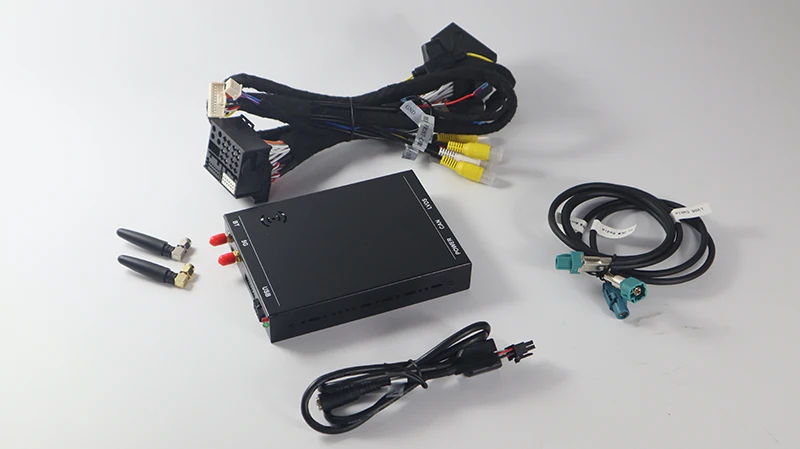
This is what i received
Attached image
netio wrote
Cyberdemon wrote
Sorry can you upload a picture? If there isn't a quad lock connector something sounds like it's missing.

You should have the main harness built into the unit with a male and female quad lock adapter if you purchased the CIC unit.
This is what i received
This was sent to you as a Carsara CIC kit for an E9x? Or are you driving something else.

This is not the same box that most of us are used to seeing. Not sure if they sent you the wrong thing, you have a different car and box, or they've done a complete refresh (which seems unlikely).

I would see if your packaging was labeled correctly as a CIC unit and not something for NBT or another vehicle.
netio wrote
The link didn't work but I went back and the first hit I get for Carsara now brings up this unit:

Image hosted on: ae01.alicdn.com

The box is clearly different than the one most of us have installed, looks smaller, different connections, so it appears they have a new version.

But in the picture, it clearly shows the main harness with the quad lock connectors which you don't seem to have. I can't quite tell from your picture, but its possible this new unit no longer actually replaces the full quadlock and one of the connectors on the quadlock is removable? That may make life easier if you don't actually have to have two full quadlock connectors back there. Either way you should have up to date instructions if mine are not correct.

I would reach back out to them and show them a picture of your harness and ask for instructions. If you get it working, please let us know how it goes - I will update the main description to indicate the original box is no longer available.

I still see they have a link to the older unit here.
netio wrote
This is what i received
Mine is exactly the same. No quadlock.
Besides the quadlock, the other major difference is one LVDS cable into Carplay unit which has 2 cables out to Monitor and Radio.

Attached is the instruction booklet emailed out.
Thank you for the instructions Blk33... I have connected everything however I can't get the controller to respond. The only jumper setting I have set to on position is 5 for screen resolution 1280*480. Have tested all options however can't get the controller to respond.
netio wrote
Thank you for the instructions Blk33... I have connected everything however I can't get the controller to respond. The only jumper setting I have set to on position is 5 for screen resolution 1280*480. Have tested all options however can't get the controller to respond.
it seems like the new carsara unit is now like kremersino v3 unit, which required the idrive controller harness to be installed in order for everything to work. Since there is no quadlock, I don't believe you can get aux audio without the aux cable either.
bighindu79 wrote
it seems like the new carsara unit is now like kremersino v3 unit, which required the idrive controller harness to be installed in order for everything to work. Since there is no quadlock, I don't believe you can get aux audio without the aux cable either.
Yes, it draws power from the drive controller plug. Nothing plugs into the main head unit. I am not sure if I have a faulty harness, I just can't seem to make the controller work even after testing all possible jumper settings.

I have contacted the seller and waiting to hear back from them.
netio wrote
Thank you for the instructions Blk33... I have connected everything however I can't get the controller to respond. The only jumper setting I have set to on position is 5 for screen resolution 1280*480. Have tested all options however can't get the controller to respond.
I'm not in a position to install mine for a week or so, so I'm watching with interest your progress. I did email Carsara querying the quadlock, but haven't received anything back yet.
Good luck.
Cheers
Rob
