

Jerezblack.m3 wroteLook on the first page of this thread. I gave an example of a workaround that would in theory allow you to just replace the CCC display with a CIC version of a higher resolution, without needing to do the full CIC retrofit. It would cost around $200.Can you just get the CIC screen and have a better resolution or do you really have to get the other parts too?
783.3KVIEWS
2.3KREPLIES
630APPRECIATES
06-29-2026LAST POST
Yay!
My camera has arrived...
Now the wait for the next batch of Mr12Volt units...
My camera has arrived...
Now the wait for the next batch of Mr12Volt units...
2009550iMSport wroteYeah could certainly be (way) better but an infinite improvement over my jankey aux>bluetooth and ipod adapter added so long ago. This is my lowly shared DD duty N52 e90, so this was already a stretch relative to it's value.Have you seen the CCC version? I would’ve just waited through the backorder and done a CIC upgrade, but to each his own.
I was finally able to hook up my rear camera to this unit. It took much longer than I expected because the "Gear Position" option under Reverse Option setting somehow did not work (probably because this is an install in a e60 6MT M5). I had to hook up a separate wire from one of the reverse light wire from the rear and connect it to the 12V reverse wire on the Mr12Volt unit. I then changed the Reverse Option setting to "Reverse State". The rear camera now works when I shift into reverse, except the reverse track lines and PDC display are off center to the left. Does anyone know how I can center them? Does this have something to do with my camera? I am using a 720p rear cam.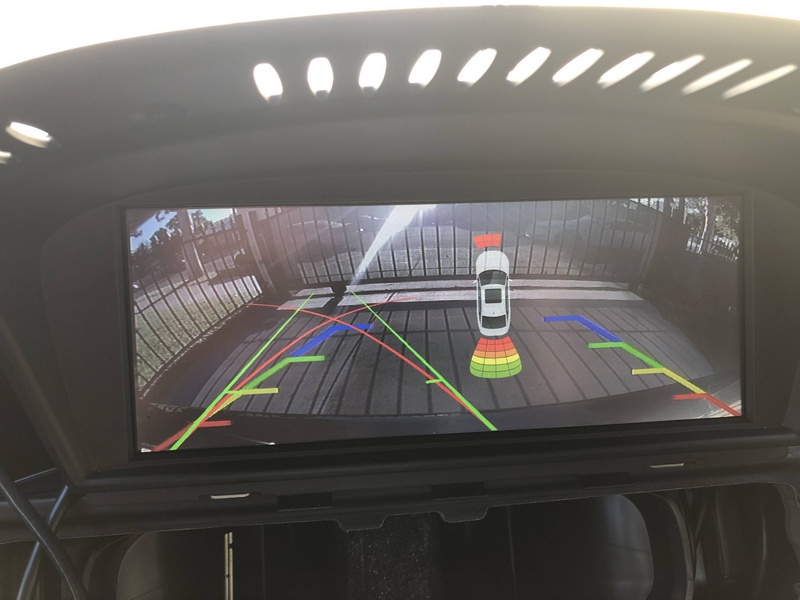
Thank you to everyone working on this project and for all of the great advice. Got CIC mostly installed with some cuts on my hands as souvenirs. Still need to do some coding and adapting to loop out HD Radio. Backup camera arrived yesterday and still awaiting OEM Mic splitter (thanks to 2009550imsport) and Mr12volt unit. Does anyone think that Mr12volt will be able to detect the old ccc setup? What coding system do you folks use.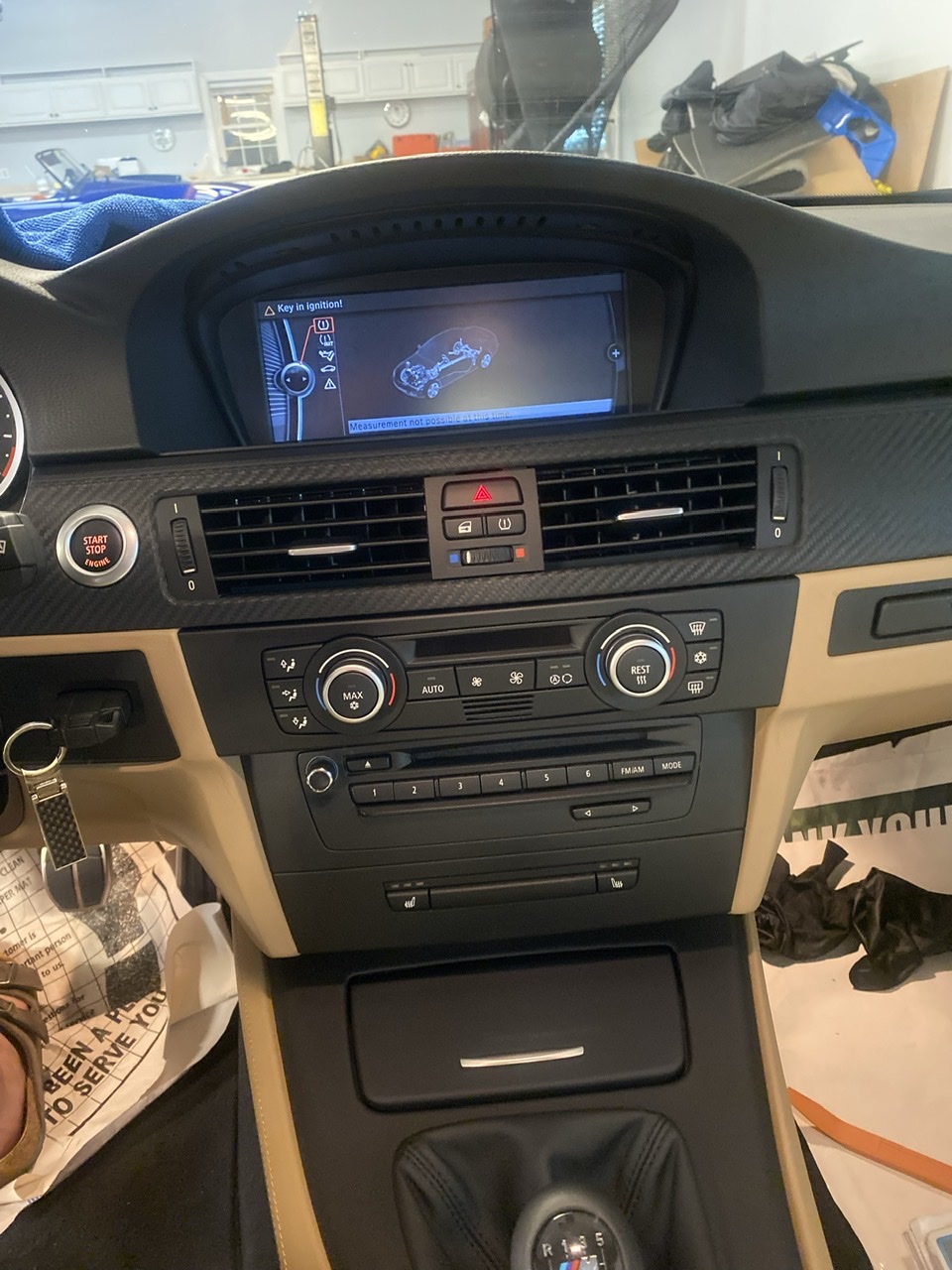

georgebmwM3 wroteThe retrofit looks good! From the photos, I can’t tell whether you installed a CIC controller or still have the original CCC controller knob. I recently retrofitted CIC from CCC in my e60 M5 so I can add Carplay. Even though the CIC was working well with the old CCC controller, the Mr12Volt unit would not recognize its signals so I was unable to control it within Carplay. This is even after I modified the cable harness for Mr12Volt and switched over the 4 wires for the idrive controller from the 8 pin connector to the 4 pin connector needed to supply power and canbus to the Mr12Volt and then back into the 8 pin connector to my CCC idrive controlller. I ended up buying a CIC idrive controller and modified my center console to get it to work (since the center console with the CIC cutout was never available for my wood trim). For the e92, it should be much easier to procure a center console so just make sure you have the newer CIC controller knob and buttons before your Mr12Volt Carplay install. Good luck!Thank you to everyone working on this project and for all of the great advice. Got CIC mostly installed with some cuts on my hands as souvenirs. Still need to do some coding and adapting to loop out HD Radio. Backup camera arrived yesterday and still awaiting OEM Mic splitter (thanks to 2009550imsport) and Mr12volt unit. Does anyone think that Mr12volt will be able to detect the old ccc setup? What coding system do you folks use.
SocalM3 wroteYes, I installed the iDrive multifunction controller back in 2009. I imagine it's good since it's working with the CIC system so far. Thanks for the advice.georgebmwM3 wroteThe retrofit looks good! From the photos, I can't tell whether you installed a CIC controller or still have the original CCC controller knob. I recently retrofitted CIC from CCC in my e60 M5 so I can add Carplay. Even though the CIC was working well with the old CCC controller, the Mr12Volt unit would not recognize its signals so I was unable to control it within Carplay. This is even after I modified the cable harness for Mr12Volt and switched over the 4 wires for the idrive controller from the 8 pin connector to the 4 pin connector needed to supply power and canbus to the Mr12Volt and then back into the 8 pin connector to my CCC idrive controlller. I ended up buying a CIC idrive controller and modified my center console to get it to work (since the center console with the CIC cutout was never available for my wood trim). For the e92, it should be much easier to procure a center console so just make sure you have the newer CIC controller knob and buttons before your Mr12Volt Carplay install. Good luck!Thank you to everyone working on this project and for all of the great advice. Got CIC mostly installed with some cuts on my hands as souvenirs. Still need to do some coding and adapting to loop out HD Radio. Backup camera arrived yesterday and still awaiting OEM Mic splitter (thanks to 2009550imsport) and Mr12volt unit. Does anyone think that Mr12volt will be able to detect the old ccc setup? What coding system do you folks use.
Well, big shout out to my fellow BMW enthusiast Devin Sukhu (Mizta insane). He sourced me out a complete CIC unit and sent it to me. He helped me through the installation process and when we hit obstacles, such as an HD radio that needed a MOST loop, he sent that free of charge and the entire coding set. Then he went through the coding process and help set up HD radio, SiriusXM, and Nav. I'm now waiting for the OEM mic splitter from 2009550imsport and the mr12volt. Devin is standing by to help me with that install. Really looking forward to it!
georgebmwM3 wroteThanks George! Happy to help!Well, big shout out to my fellow BMW enthusiast Devin Sukhu (Mizta insane). He sourced me out a complete CIC unit and sent it to me. He helped me through the installation process and when we hit obstacles, such as an HD radio that needed a MOST loop, he sent that free of charge and the entire coding set. Then he went through the coding process and help set up HD radio, SiriusXM, and Nav. I'm now waiting for the OEM mic splitter from 2009550imsport and the mr12volt. Devin is standing by to help me with that install. Really looking forward to it!
I have been in contact with Mr12Volt regarding my issue with my off-center reverse track lines. They initially told me to just turn off the lines  but after I requested a fix, they promptly send my a software update the next day. The update was easily done via a USB stick in seconds and corrected my problem
  I gotta say I am pretty impressed with Mr12Volt's service! Seems like they designed these units in house so they can make changes/updates very quickly.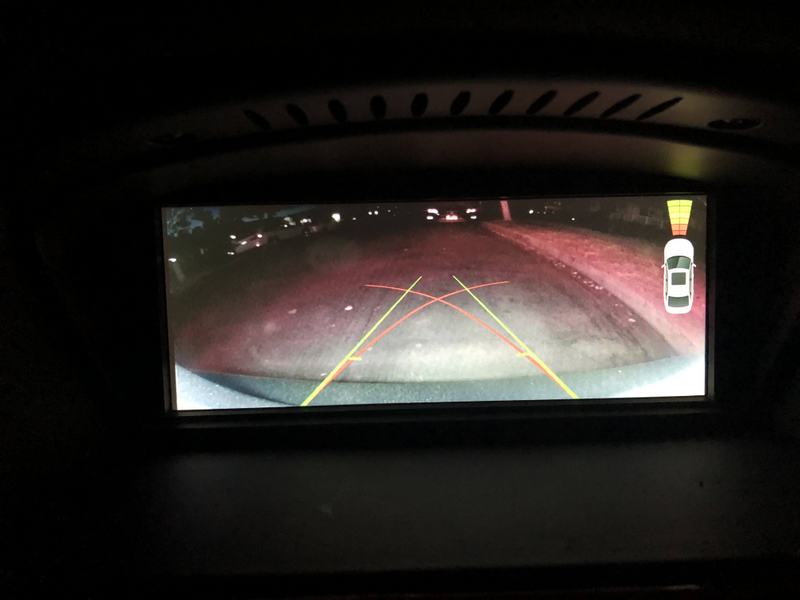
but after I requested a fix, they promptly send my a software update the next day. The update was easily done via a USB stick in seconds and corrected my problem I gotta say I am pretty impressed with Mr12Volt's service! Seems like they designed these units in house so they can make changes/updates very quickly.
New firmware update - LP2021_bmwCIC_App_v1.5.bin
P2000 SERIES FIRMWARE UPDATES
MCU Change Log:
20210916 Added steering wheel "Voice Command" button SIRI activation
P2000 SERIES FIRMWARE UPDATES
MCU Change Log:
20210916 Added steering wheel "Voice Command" button SIRI activation
SocalM3 wroteWhich firmware version they sent you? Wonder if it is the latest one posted on their site.I have been in contact with Mr12Volt regarding my issue with my off-center reverse track lines. They initially told me to just turn off the lines
djan9el wroteI don't think it was a firmware upgrade but rather a small software update file because I used an USB instead of the SD card to update it.Which firmware version they sent you? Wonder if it is the latest one posted on their site.
SocalM3 wroteOh, I see. Their site still have an older version for the general software update for all P2000 (last update 20210802). Would you be able to share the one they sent you? I'll like to have it available in case I also have problems with the backup camera lines when I get my unit. Thanks.I don't think it was a firmware upgrade but rather a small software update file because I used an USB instead of the SD card to update it.
djan9el wroteYes, of course. I had to rename the original "zip" file to a "doc" file since it is just slightly bigger than this forum's zip file size limit for attachments. Just download it and rename it from a .doc to a .zip file and follow the instructions below.Oh, I see. Their site still have an older version for the general software update for all P2000 (last update 20210802). Would you be able to share the one they sent you? I'll like to have it available in case I also have problems with the backup camera lines when I get my unit. Thanks.
Here's the update file.
Please prepare a USB not bigger than 32GB and FAT32 formatted
Procedures:
1. unzip the file, you will see 4 files, put them into the root directory of an empty USB stick. DO NOT alter the filenames;
2. insert the USB stick into P2000, press "OK" of the BMW knob for 8 seconds, this will reset the P2000 and start the update process;
3. the update process shouldn't take longer than 10 seconds, the P2000 will restart again after the update;
4. unplug the USB stick, press "OK" for 8 seconds again to reboot the P2000;
5. After the reboot, you should see the tracking lines in the right positions;
It is interesting to note that you can soft reset the unit by pressing down (OK) on the knob for 8 seconds.
SocalM3 wroteVery useful info!It is interesting to note that you can soft reset the unit by pressing down (OK) on the knob for 8 seconds.
I got a blank screen once but was driving and didn't want to pull over an try to get it working. I parked the car and came back and it was working.
Knowing how to reboot it while driving would have got me working sooner. Thanks.
For those with the Mr12Volt unit installed, how do you find the microphone quality on phone calls? Here are my experience with 3 different options:
1) I tried the mic splitter for the OEM microphone but was told that the sound on the other end was horrible and they can barely hear me and there is a lot of background noise.
2) I then switched to the supplied microphone and rigged it to attach to the blank microphone plate on the sunroof panel. It seems to work well when the engine is off but my car is fairly noisy with an aftermarket exhaust so it does not sound very good with the engine on.
3) The last option was to bluetooth the phone separately to the OEM bluetooth for phone calls. This has the best sound quality but the only issue is that while I am on the phone call, the screen switches from Carplay back to the OEM idrive phone screen.
Any other suggestions to improve the sound would be much appreciated!
1) I tried the mic splitter for the OEM microphone but was told that the sound on the other end was horrible and they can barely hear me and there is a lot of background noise.
2) I then switched to the supplied microphone and rigged it to attach to the blank microphone plate on the sunroof panel. It seems to work well when the engine is off but my car is fairly noisy with an aftermarket exhaust so it does not sound very good with the engine on.
3) The last option was to bluetooth the phone separately to the OEM bluetooth for phone calls. This has the best sound quality but the only issue is that while I am on the phone call, the screen switches from Carplay back to the OEM idrive phone screen.
Any other suggestions to improve the sound would be much appreciated!
Some Dr. Google searching led me here. I ran into the issue where install is complete but the CD Changer is not showing in the menu. Guessing it's due to the same issue referenced in the thread.
In my haste I purchased an OBDII bluetooth adapter thinking I could use Bimmercode to activate the CD Changer. Is this possible or will I need to go the ICOM/K+DCAN Cable and NCS Expert route to accomplish? The lack of any info on it would lead me to believe I have to go the latter route.
Cheers for the thread and great discussion, it's the only place I've found where others have installed the P2000.
In my haste I purchased an OBDII bluetooth adapter thinking I could use Bimmercode to activate the CD Changer. Is this possible or will I need to go the ICOM/K+DCAN Cable and NCS Expert route to accomplish? The lack of any info on it would lead me to believe I have to go the latter route.
Cheers for the thread and great discussion, it's the only place I've found where others have installed the P2000.
liquidh2o wroteTo code CDMM_CHANGER_3 to mp3_cdc using Bimmercode, you need to use Expert Mode.Some Dr. Google searching led me here. I ran into the issue where install is complete but the CD Changer is not showing in the menu. Guessing it's due to the same issue referenced in the thread.
In my haste I purchased an OBDII bluetooth adapter thinking I could use Bimmercode to activate the CD Changer. Is this possible or will I need to go the ICOM/K+DCAN Cable and NCS Expert route to accomplish? The lack of any info on it would lead me to believe I have to go the latter route.
Cheers for the thread and great discussion, it's the only place I've found where others have installed the P2000.
Headunit -> Expert Mode -> 3000 HMI
Find CDMM_CHANGER_3 option and change it to mp3_cdc
CODE -> START CODING
Note: This is for my 2010 E92 M3, so hopefully it's the same/similar with other models
SocalM3 wroteJust wanted to say thanks for reporting this. Option 1 is what it seems like most of us want to do, and what I personally was intending to do.For those with the Mr12Volt unit installed, how do you find the microphone quality on phone calls? Here are my experience with 3 different options:
1) I tried the mic splitter for the OEM microphone but was told that the sound on the other end was horrible and they can barely hear me and there is a lot of background noise.
2) I then switched to the supplied microphone and rigged it to attach to the blank microphone plate on the sunroof panel. It seems to work well when the engine is off but my car is fairly noisy with an aftermarket exhaust so it does not sound very good with the engine on.
3) The last option was to bluetooth the phone separately to the OEM bluetooth for phone calls. This has the best sound quality but the only issue is that while I am on the phone call, the screen switches from Carplay back to the OEM idrive phone screen.
Any other suggestions to improve the sound would be much appreciated!
Maybe try reaching out to mr12volt? They seem to have been receptive with other feedback and providing software fixes. Maybe the issue can be fixed?
djan9el wroteThat did the trick, thank you!To code CDMM_CHANGER_3 to mp3_cdc using Bimmercode, you need to use Expert Mode.
Headunit -> Expert Mode -> 3000 HMI
Find CDMM_CHANGER_3 option and change it to mp3_cdc
CODE -> START CODING
Note: This is for my 2010 E92 M3, so hopefully it's the same/similar with other models
Up and running now without any issues. Look forward to no longer propping my iPhone up against the nav screen to use Waze

2009550iMSport wroteRob, did the splitters make it to you? Thanks!Update for OEM mic splitter buyers:
Hey guys! Don’t worry, I haven’t forgotten about you! I’m still waiting on the splitters to come in the mail. They’re finally in the country but were held up at customs for some reason. Thank you AliExpress “Premium” Shipping
They’ve cleared customs as of yesterday and are en route to my house. I imagine they’ll be here on Monday, if not today. I will send an email out to everyone individually whenever I get them mailed out.
Regards,
Rob

