783.1KVIEWS
2.3KREPLIES
630APPRECIATES
06-29-2026LAST POST
SocalM3 wrote
For those with the Mr12Volt unit installed, how do you find the microphone quality on phone calls? Here are my experience with 3 different options:

1) I tried the mic splitter for the OEM microphone but was told that the sound on the other end was horrible and they can barely hear me and there is a lot of background noise.

2) I then switched to the supplied microphone and rigged it to attach to the blank microphone plate on the sunroof panel. It seems to work well when the engine is off but my car is fairly noisy with an aftermarket exhaust so it does not sound very good with the engine on.

3) The last option was to bluetooth the phone separately to the OEM bluetooth for phone calls. This has the best sound quality but the only issue is that while I am on the phone call, the screen switches from Carplay back to the OEM idrive phone screen.

Any other suggestions to improve the sound would be much appreciated!
HI;
Thanks for bringing this up. Maybe 2009550imsport has some suggestions with the mic splitter.

I have some suggestions;

1. Check to see if the mic splitter wires are kinked or are interfered with in any way.
2. Check if there are any breaks in the wires.
3. Maybe they need to be insulated.

Hope this helps. I haven't received my mic splitter or the Mr12Volt unit. I guess when we start doing our installs we will see if we have the same issue.
georgebmwM3 wrote
HI;
Thanks for bringing this up. Maybe 2009550imsport has some suggestions with the mic splitter.

I have some suggestions;

1. Check to see if the mic splitter wires are kinked or are interfered with in any way.
2. Check if there are any breaks in the wires.
3. Maybe they need to be insulated.

Hope this helps. I haven't received my mic splitter or the Mr12Volt unit. I guess when we start doing our installs we will see if we have the same issue.
Thank you for the suggestions. I played around with the different options this afternoon. I used another splitter with similar results with the loud background noise and low voice volume. I also tried using the VW microphone commonly found in other Carplay kits but it did not seem to work (other end could not hear me at all).

Someone earlier asked via PM how I switch between Carplay and the OEM BT phone connection. You can change how you want to handle call from the phone itself, like if you were switching the phone call to the speakerphone on the iphone. The phone and the unit seems to remember what you used last. You will also be automatically switched back to idrive when the phone call starts with the OEM BT connection and switch back to Carplay once the call has ended. The major issue is that you cannot access Carplay during the call via the OEM BT phone connection. I pressed the volume but it will not change back to Carply. Somehow the unit will stay in idrive until the call has ended. This is what I think is the biggest disadvantage of using the OEM BT for the phone call despite the excellent quality.

I honestly think the microphone supplied by Mr12volt works okay but definitely not as clear when directly compared to the OEM mic via the BMW BT connection, esp if you have a lot of background noise like a loud exhaust.
Has anyone tried this on an f30 with cic? I have a 2013 with cic and curious what others have experienced. Does it integrate with your heads up display? If you can scroll your music with your steering wheel then in theory it should show on the hud since it usually mimics that. Anyways anyone with experience on an f30 and hud please chime in :)
SocalM3 wrote
Thank you for the suggestions. I played around with the different options this afternoon. I used another splitter with similar results with the loud background noise and low voice volume. I also tried using the VW microphone commonly found in other Carplay kits but it did not seem to work (other end could not hear me at all).

Someone earlier asked via PM how I switch between Carplay and the OEM BT phone connection. You can change how you want to handle call from the phone itself, like if you were switching the phone call to the speakerphone on the iphone. The phone and the unit seems to remember what you used last. You will also be automatically switched back to idrive when the phone call starts with the OEM BT connection and switch back to Carplay once the call has ended. The major issue is that you cannot access Carplay during the call via the OEM BT phone connection. I pressed the volume but it will not change back to Carply. Somehow the unit will stay in idrive until the call has ended. This is what I think is the biggest disadvantage of using the OEM BT for the phone call despite the excellent quality.

I honestly think the microphone supplied by Mr12volt works okay but definitely not as clear when directly compared to the OEM mic via the BMW BT connection, esp if you have a lot of background noise like a loud exhaust.
Is it possible to obtain a 2nd original BMW microphone with cabling, and use this instead of any 3rd party mic, mounting it in the spare grille space, and use some sort of splitter/bridge solution?
Tony B wrote
Is it possible to obtain a 2nd original BMW microphone with cabling, and use this instead of any 3rd party mic, mounting it in the spare grille space, and use some sort of splitter/bridge solution?
It should be physically easy to do and you can probably just splice the wires if you don't mind cutting into them. I suspect the issue has to do with the gain/noise cancellation is different for the Mr12Volt unit when compared to the OEM system.
SocalM3 wrote
It should be physically easy to do and you can probably just splice the wires if you don't mind cutting into them. I suspect the issue has to do with the gain/noise cancellation is different for the Mr12Volt unit when compared to the OEM system.
Which again- i suspect would be able to be adjusted with a software update.
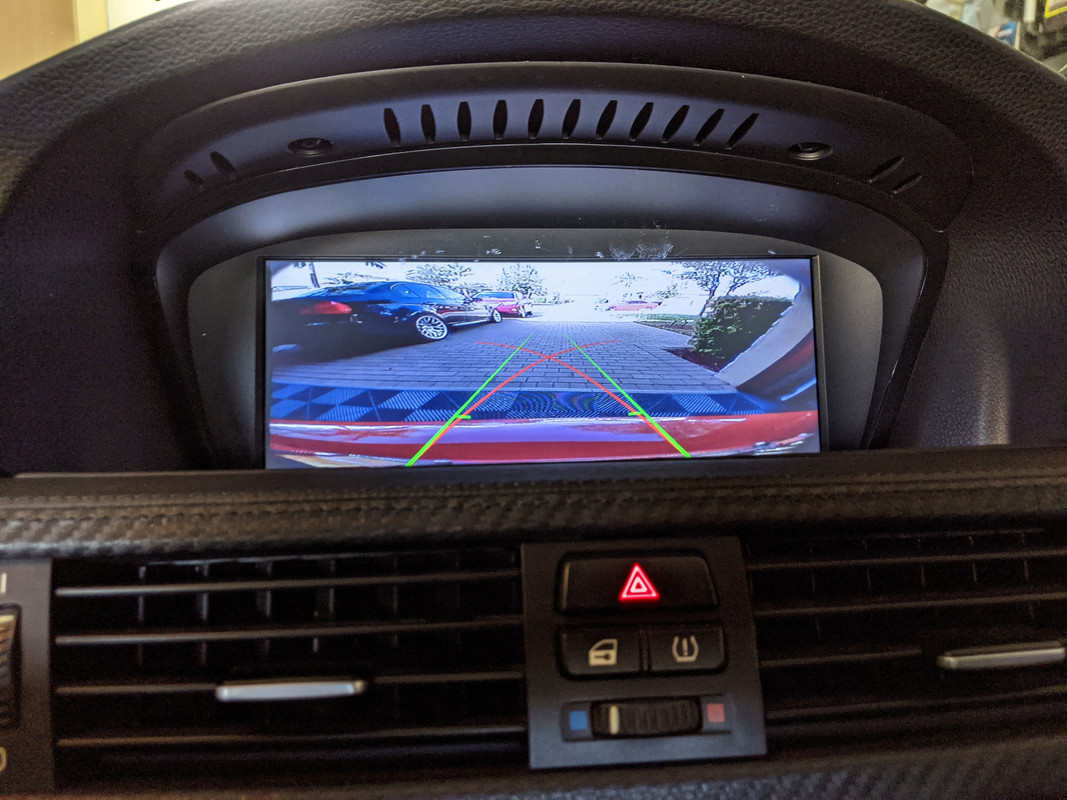
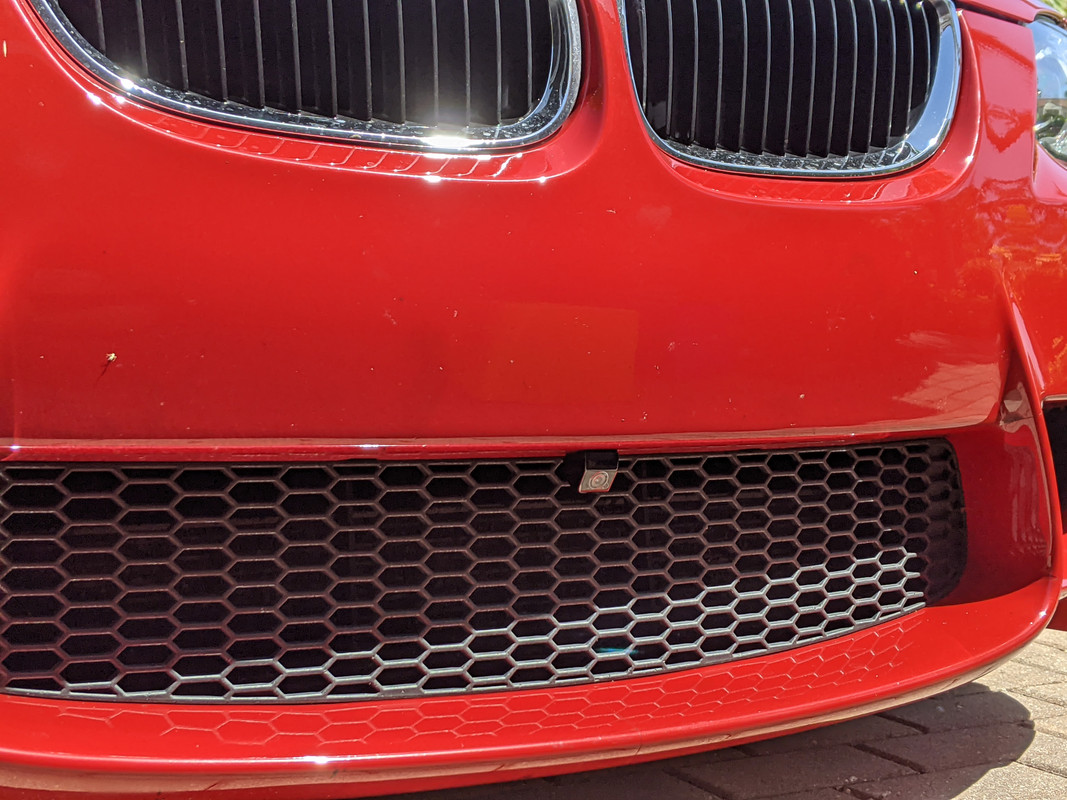
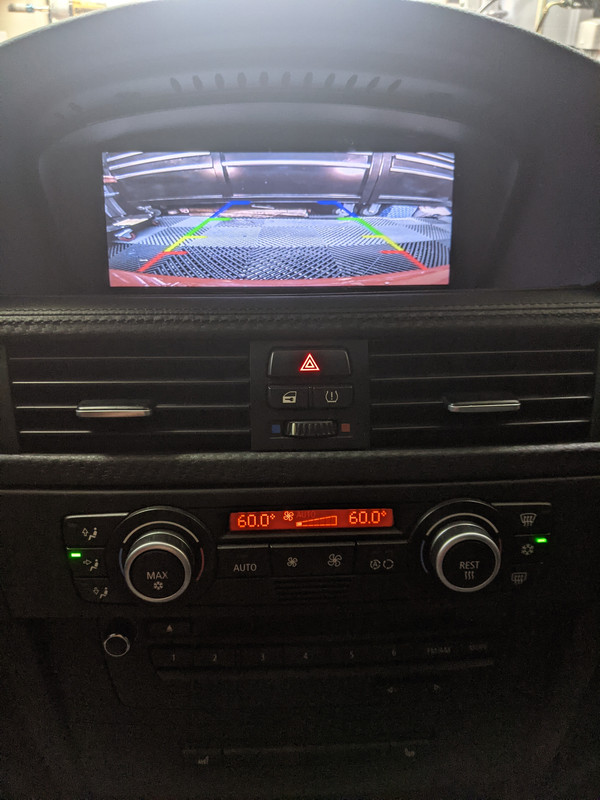
Just wanted to add pictures of my front and rear camera, honestly the resolution/picture quality isn't great, I don't know if it's the shitty amazon fisheye cameras or if it's because the video is stretched. It's not like I am recording motion pictures here, I just need to see where the curb is, so it's good enough for that.

Front:
Image hosted on: i.postimg.cc

Rear:
Image hosted on: i.postimg.cc

How the front camera looks mounted:
Image hosted on: i.postimg.cc
tdott wrote
Just wanted to add pictures of my front and rear camera, honestly the resolution/picture quality isn't great, I don't know if it's the shitty amazon fisheye cameras or if it's because the video is stretched. It's not like I am recording motion pictures here, I just need to see where the curb is, so it's good enough for that.
Which camera brand/model you installed for the front and back? I wasn't planning to install a front camera, but after seeing this I will definitely add one to my M3, since I will be installing a GT4 front lip next week. Thanks for sharing!
tdott wrote
Just wanted to add pictures of my front and rear camera, honestly the resolution/picture quality isn't great, I don't know if it's the shitty amazon fisheye cameras or if it's because the video is stretched. It's not like I am recording motion pictures here, I just need to see where the curb is, so it's good enough for that.

How the front camera looks mounted:
How do you switch between the front and rear views? I am now tempted to install the front camera as well so I won't be parking my car 3 feet from the parking lot concrete stops :lol:
djan9el wrote
Which camera brand/model you installed for the front and back? I wasn't planning to install a front camera, but after seeing this I will definitely add one to my M3, since I will be installing a GT4 front lip next week. Thanks for sharing!
SocalM3 wrote
How do you switch between the front and rear views? I am now tempted to install the front camera as well so I won't be parking my car 3 feet from the parking lot concrete stops :lol:
There is a setting you turn on for the front camera. When you shift into drive it will switch to the front camera for a configurable number of seconds, I think I have mine set to 10 seconds.

So if you are pulling into a parking spot, you need to put it in neutral (DCT) then shift back into drive to see the front Cam.

This is the Front Camera I got: https://amzn.to/3AHnRuk
Ain't great and I never tried any others so I can't really say what is best, only that it works and the picture quality is passable but not great.

This is the rear camera I used: https://amzn.to/3kuFuIl
tdott wrote
There is a setting you turn on for the front camera. When you shift into drive it will switch to the front camera for a configurable number of seconds, I think I have mine set to 10 seconds.

So if you are pulling into a parking spot, you need to put it in neutral (DCT) then shift back into drive to see the front Cam.

This is the Front Camera I got: https://amzn.to/3AHnRuk
Ain't great and I never tried any others so I can't really say what is best, only that it works and the picture quality is passable but not great.

This is the rear camera I used: https://amzn.to/3kuFuIl
Yeah you have both lower res sensors + the stretch factor working against you.

I tested that Weivision camera in my writeup and it was definitely a lower number of scan lines which even though the CIC display is only 480 pixels high results in a blurrier image.

Details on the cameras I tried are in the carsara thread.
Hello,

I was reading about a user who experienced issues with his CCC controller working with the CIC Mr12Volt CarPlay/AA MMI Box. Has anyone else experienced this issue on a CIC-retrofitted E90 with a CCC controller?

Currently have a Kremersino V1 MMI unit I received from a fellow forum member and it works great with the current CCC controller. I am definitely interested in this newer unit for the sound quality upgrade.

TIA,
Mike
mike5124 wrote
I was reading about a user who experienced issues with his CCC controller working with the CIC Mr12Volt CarPlay/AA MMI Box. Has anyone else experienced this issue on a CIC-retrofitted E90 with a CCC controller?
My car is CIC retrofitted and it works fine.

My other car, has CCC and the Andream touch screen and the controller also doesn't work well with that. I think it might be the CCC controller sends the incorrect canbus signals. or the units are not programed to recognize the ccc controls, only the CIC ones. I can see how a company doing the software doesn't test all of them and just assumes.
tdott wrote
My car is CIC retrofitted and it works fine.

My other car, has CCC and the Andream touch screen and the controller also doesn't work well with that. I think it might be the CCC controller sends the incorrect canbus signals. or the units are not programed to recognize the ccc controls, only the CIC ones. I can see how a company doing the software doesn't test all of them and just assumes.
Did you keep the CCC controller in your retrofit or did you retrofit a CIC controller as well?
mike5124 wrote
Did you keep the CCC controller in your retrofit or did you retrofit a CIC controller as well?
Yes 1 car is full CIC retrofit.

Other car is full CCC with Andream touch screen.
Ccieszyn wrote
How about Siri activation? One thing I like about the Carsara box is how well integrated it is. I can press the talk button on the wheel and speak right to siri, just like in my newer car. Is it the same with this box or is there a caveat?

EDIT: Just saw in the other thread that there's currently no support for Siri via the steering wheel button. I'm tempted to try this box out, but that makes it a no-go for me. I make way too much use of voice commands in CarPlay to lose it by removing the Carsara. If there are any developments, discoveries or updates on this, please let us know!
FYI:
MCU Change Log
20210916 Added steering wheel "Voice Command" button SIRI activation
djan9el wrote
To code CDMM_CHANGER_3 to mp3_cdc using Bimmercode, you need to use Expert Mode.

Headunit -> Expert Mode -> 3000 HMI

Find CDMM_CHANGER_3 option and change it to mp3_cdc

CODE -> START CODING


Note: This is for my 2010 E92 M3, so hopefully it's the same/similar with other models
Very useful information! I didn't know what to do with Bimmercode, thank you very much for your input.

I think it should be put at the beginning of this thread
Rochen_00 wrote
Very useful information! I didn't know what to do with Bimmercode, thank you very much for your input.

I think it should be put at the beginning of this thread
added it to the OP :cool!:
2009550iMSport wrote
Update for those wanting an OEM mic splitter!

I can get them! They will be here in my hands in 2-3 weeks! To those of you who have emailed me wanting one, I will reach out to all of you via email later today. :thumsup:
Received my mic splitter today, thank you!
Also received mine today. Thank you!
Can't wait for you guys' feedback on the microphone sound quality with the splitter!
SocalM3 wrote
Can't wait for you guys' feedback on the microphone sound quality with the splitter!
Same here