783.1KVIEWS
2.3KREPLIES
630APPRECIATES
06-29-2026LAST POST
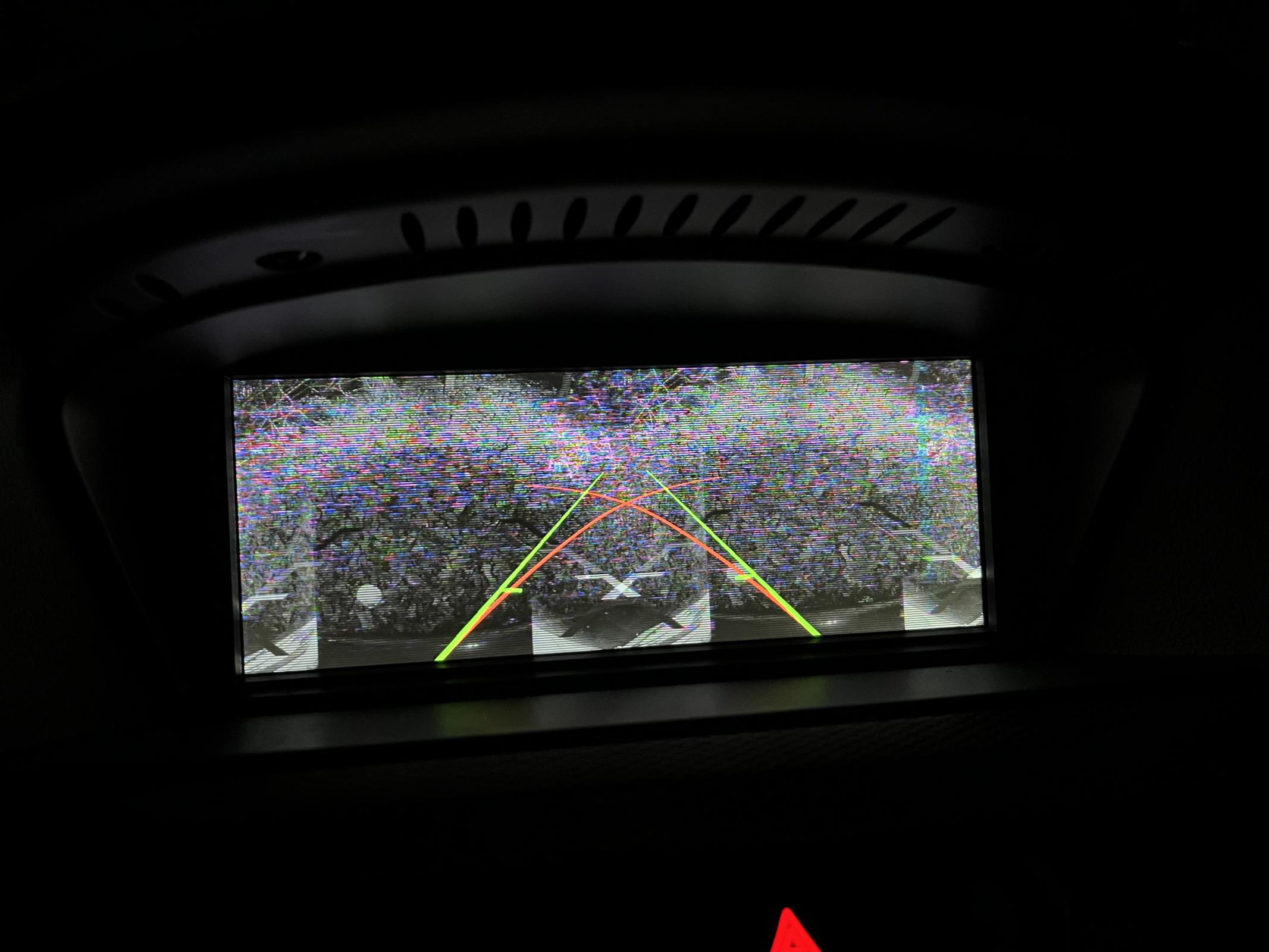
Is anyone experiencing video signal issues using the recommended Greenyi backup camera? My video picture is grainy, black and white, and doubled (see picture). I have a CIC 6MT with a trigger wire connecting the mr12volt to the reverse lights. Power to the camera is supplied from mr12volt along the power line integrated within the included video cable. As recommended here, the camera is left ungrounded.

TIA
Attached image
bsant wrote
Is anyone experiencing video signal issues using the recommended Greenyi backup camera? My video picture is grainy, black and white, and doubled (see picture). I have a CIC 6MT with a trigger wire connecting the mr12volt to the reverse lights. Power to the camera is supplied from mr12volt along the power line integrated within the included video cable. As recommended here, the camera is left ungrounded.

TIA
you need to install a 12v rectifier to stabilize the power source to the rear camera.
I started having this issue a few days ago. When I start my car, it just goes to the cd changer screen. I can't get into the Mr.12volt menu. I got to the actual module and pressed the little reset button, even tried unplugging it. Still just get this screen. Any suggestions?

EDIT: I disconnected my car's battery for a few min. Once I reconnected it and powered everything on, the Mr 12volt fired right up. This has happened to me a few times recently, hopefully it's not a forever thing.

Double Edit/update: This problem is still happening. It basically just works when it wants to. I pulled my glove box and checked the unit and it's pretty warm, I wonder if it's getting too hot? It dosent seem like there's a fan inside to keep it cool.
Attached image
mare92 wrote
EDIT: IT WORKS REALLY GOOD! I connected it to the wrong port (aux on mr12volt, not on quadlock) at first, so that is why the mic was terrible:


Installed it, microphone quality over OEM system is same as before, but if I switch to CarPlay mode which is connected via splitter to AUX port on Mr12Volt unit, the person on the other side can hardly understand me, so it seems it is not any better than on your old systems… any suggestions?

This is the System info, guess it is the latest…
(it is too quick, set it to 0,25 speed in Youtube) and video that I linked under b) for E93 mic.
Just wanted to say thank you for posting all this info. I used your guidance to complete the installation on my E93 335i. The install went without a hitch. I tucked the quadlock on the lower right side, below and to the right of the cage. This allowed me to get the radio back in easily on my first try.

I also was able to code the CD changer successfully with ProTools using your suggestion. While I was there, I also installed the GreenYi 720p AHD rear view camera, and the picture is great. I did need to extend the video and power cables about 2 feet though. The E93 requires a longer cable to follow the routing for the convertible mechanism, and the GreenYi camera's cable was just a touch too short.

Wireless Android Auto worked perfectly on the first try simply by pairing Bluetooth. The car did all the rest to get AA running. So far the sound quality is much better than the AUX cable I had used before.

Finally, I installed the Inductiv wireless charger in place of the factory cigarette lighter tray, and it really completes the package to modernize the interior. It supports wireless fast charging as well, so no worries about losing power while running AA.
anselmw wrote
Which GreenYi, for E90 M3, seems, like there are multiple versions?
Make sure it's for an E9X chassis, and get the model that is 720P AHD. Do not get the 1080P AHD model.
bsant wrote
Is anyone experiencing video signal issues using the recommended Greenyi backup camera? My video picture is grainy, black and white, and doubled (see picture). I have a CIC 6MT with a trigger wire connecting the mr12volt to the reverse lights. Power to the camera is supplied from mr12volt along the power line integrated within the included video cable. As recommended here, the camera is left ungrounded.

TIA
I recall someone else reporting this issue on the Mr12Volt Facebook group. If I remember right, that person had purchased the 1080P AHD camera, while the Mr12Volt only supports up to 720P AHD. If that is what you have, there are two options:

a) Replace the camera with 720P AHD version

b) Cut the white wire on your 1080P camera. That should downgrade the signal from 1080p AHD to 720P CVBS. The CVBS signal should work fine with the Mr12Volt, but the picture quality will not be as good as the dedicated 720P AHD camera.

If you do have the right 720P camera and it is doing this, I would try troubleshooting by hooking up the ground to a proper grounding point on the chassis and seeing if that fixes the picture.
S65Hunter wrote
I started having this issue a few days ago. When I start my car, it just goes to the cd changer screen. I can't get into the Mr.12volt menu. I got to the actual module and pressed the little reset button, even tried unplugging it. Still just get this screen. Any suggestions?

EDIT: I disconnected my car's battery for a few min. Once I reconnected it and powered everything on, the Mr 12volt fired right up. This has happened to me a few times recently, hopefully it's not a forever thing.

Double Edit/update: This problem is still happening. It basically just works when it wants to. I pulled my glove box and checked the unit and it's pretty warm, I wonder if it's getting too hot? It dosent seem like there's a fan inside to keep it cool.
I noticed in your picture that your sound level is turned off. I had a similar situation of Mr12Volt not starting and thinking it was broken after turning the volume off when a song autoplayed and I didn't want to deal with finding which application was playing it to pause it. Once I turned the volume back on, the CarPlay screen came back. This may be your issue since it came back after disconnecting the battery which may have reset the volume knob to low. Hopefully that solves your issues.
03BeastCharmer wrote
I noticed in your picture that your sound level is turned off. I had a similar situation of Mr12Volt not starting and thinking it was broken after turning the volume off when a song autoplayed and I didn't want to deal with finding which application was playing it to pause it. Once I turned the volume back on, the CarPlay screen came back. This may be your issue since it came back after disconnecting the battery which may have reset the volume knob to low. Hopefully that solves your issues.
Absolutely, Volume on Mute does not allow the Mr12volt system to work :thumbsup:
bsant wrote
Is anyone experiencing video signal issues using the recommended Greenyi backup camera? My video picture is grainy, black and white, and doubled (see picture). I have a CIC 6MT with a trigger wire connecting the mr12volt to the reverse lights. Power to the camera is supplied from mr12volt along the power line integrated within the included video cable. As recommended here, the camera is left ungrounded.

TIA
I am about to wire mine up but that does not sound like it is wired correctly. Thought the trigger wire goes to the trigger wire output of the mr 12volt and the other end goes to the reverse light.

The camera power goes to either the battery with maybe a relay. Otherwise you run a longer wire and you take the 12v from the mr 12volt power output. I am going to try this setup as I already have the power wire from my previous rear cam so I will use that for power and then pull the rca cable with trigger wire for that.

I will see if this works...
BalanBro wrote
Make sure it's for an E9X chassis, and get the model that is 720P AHD. Do not get the 1080P AHD model.
Thanks, I purchased the 720 AHD one, will try without cutting the loop, then cutting it after. I wish they would integrate another power line into the cable, it would simplify the install as then you have access to the trigger wire and 12v power from the mr 12volt.
anselmw wrote
Thanks, I purchased the 720 AHD one, will try without cutting the loop, then cutting it after. I wish they would integrate another power line into the cable, it would simplify the install as then you have access to the trigger wire and 12v power from the mr 12volt.
I don't think you would need both wires. Are you auto or manual?

If auto, then a trigger is not required as the mr12volt should be triggered through canbus. You'd only need to run the power to the camera from the mr12volt using the included power wire.

If manual, you would need a trigger, but all you should have to do is run 12V from your reverse light to your camera's power, as well as the power on the video cable for your camera. This wire would then be hooked up to the rear camera trigger input on the Mr12Volt so the unit knows when you are in reverse. You should not need to use the rear camera power output on the Mr12volt, as the camera should be powered directly by the wire coming from the reverse lights.

My E93 is an auto, so I didn't have to do the latter, but I did this on a different vehicle I used to own that was a manual transmission.
BalanBro wrote
I don't think you would need both wires. Are you auto or manual?

If auto, then a trigger is not required as the mr12volt should be triggered through canbus. You'd only need to run the power to the camera from the mr12volt using the included power wire.

If manual, you would need a trigger, but all you should have to do is run 12V from your reverse light to your camera's power, as well as the power on the video cable for your camera. This wire would then be hooked up to the rear camera trigger input on the Mr12Volt so the unit knows when you are in reverse. You should not need to use the rear camera power output on the Mr12volt, as the camera should be powered directly by the wire coming from the reverse lights.

My E93 is an auto, so I didn't have to do the latter, but I did this on a different vehicle I used to own that was a manual transmission.
thanks, mine is automatic, so if it is just power I will try that! Makes install even more simple, thanks
For the folks with their cameras working properly, is it normal to have a long boot-up delay for getting a picture? When I go in to start the car, I wait for the Mr12Volt logo to clear and show the units interface. At this point when I put the car in reverse, the reverse mode turns on with the guidance lines, but there is no picture.

It seems like I have to wait over a minute before the camera actually provides a picture. The camera then works perfectly fine after this initial start-up period until I shut everything back down.
No, that isn't normal.

I would try first making sure the unit is up to date ie microSD.

If that doesn't solve it, check the ground connection on the camera.

Then check all the other connections. The included wires are literally the thinnest possible wires lol. Any connection you made better be spot on.

Personally, mine is definitely not instant. But the picture and teh lines show up at the same time, after a few seconds delay.

and it doesn't work perfect. 80% of the time it works perfect, other times it takes a while, or is staticy and bad picture, and once in a while just black screen. I think My ground connection is weak TBH
Finally got it all wired up. Wiring confirmed. No need for trigger point for auto cars. Also greenyi cam 720p works good. Thanks for everyone’s help. Seems to be working fine. Also key was removing my phone from Bluetooth as it would sometimes lose audio and go to the Bluetooth. Once phones removed from the bmw setup. The mr12volt works fine.
Does anybody have their backup camera consistently working in AHD mode? I've tried two different cameras (the most recent is a brand new GreenYi AHD 720P as suggested on this forum).. when I have the camera set for AHD mode I get inconsistent results.. half the time I get either a garbage video feed, black screen, or the video split into two mirrored videos (very strange). I've read other posts about the backup camera inconsistently working as well.

With my previous Mr12Volt CIC (P2000-MD) it was working reliably, but would flicker for 1-2 seconds before the video would become stable. With the most recent unit (the new one with the OEM mic support), the same camera does not work consistently.

Note I have tried two different backup camera filters/voltage stabilizers without any change in results.

I just cut the white wire to put the camera into CVBS mode and its now working as expected. I'm fine just leaving it in CVBS mode but was curious if anybody actually has theirs working 100% reliably in AHD mode.
brettcp wrote
Does anybody have their backup camera consistently working in AHD mode? I've tried two different cameras (the most recent is a brand new GreenYi AHD 720P as suggested on this forum).. when I have the camera set for AHD mode I get inconsistent results.. half the time I get either a garbage video feed, black screen, or the video split into two mirrored videos (very strange). I've read other posts about the backup camera inconsistently working as well.

With my previous Mr12Volt CIC (P2000-MD) it was working reliably, but would flicker for 1-2 seconds before the video would become stable. With the most recent unit (the new one with the OEM mic support), the same camera does not work consistently.

Note I have tried two different backup camera filters/voltage stabilizers without any change in results.

I just cut the white wire to put the camera into CVBS mode and its now working as expected. I'm fine just leaving it in CVBS mode but was curious if anybody actually has theirs working 100% reliably in AHD mode.
Mine works perfect in ahd mode. I believe cutting the wire is ahd mode.
anselmw wrote
Mine works perfect in ahd mode. I believe cutting the wire is ahd mode.
Thanks, the GreenYi camera spec shows that cutting the white wire puts it into CVBS mode (and within the Mr12Volt settings I can change the backup camera type from Auto to CVBS and it works). Maybe other camera models are the opposite when cutting the wire.

Anyway, its all working fine now in CVBS mode. Was just curious if others are having seeing the same with the very latest P2000-CICMM as its behavior is slightly different than the previous P2000-MD model.
drwankel wrote
There's a simpler method to allow you to root cause this, assuming the car was working correctly before hand.

Unplug the fiber optic connection on the mr12volt unit while the car is on. Do you see red light coming out of the cable? You should. If you don't, its not the unit. Assuming you don't, work your way backwards from the spliter. Is there light coming from fiber optic connection on the vehicle harness? There should be. Remember, MOST is a loop. Each device sends the signal to the next device in the loop. When the loop is broken, you just need to walk back to where you lose signal.
I've been having an issue with my install where all the CD slots are marked as unchecked and my CIC headunit is not recognizing my mr12volt either. When searching through this thread, I think this may be my problem. 2011 CIC w/factory combox and HiFi speaker system FWIW.

Image hosted on: i.imgur.com

I've disconnected/reconnected everything going in/out of the FO splitter and believe it should be correct. I'm seeing a red light from the FO connection when unplugging the splitter from mr12volt and mr12volt itself is also showing a red light. I can also hold down the CIC dial for ~10 seconds and watch mr12volt reset itself:

Image hosted on: i.imgur.com

However, I'm not seeing a red light from the OEM green/black FO which I believe is what you meant by "there should be a red light coming from the fiber optic connection in the vehicle harness". I'm also thinking I broke the MOST loop somewhere, but my original CIC unit is working as normal right now (full sound/audio) even with the mr12volt connected, so I'm even more confused, as there wouldn't be working sound if I had broken the MOST loop (correct me if I'm wrong, still learning!) Maybe it's the heat of being in my garage for the last few hours - I'm understanding that if vehicle harness isn't showing that red light, then it would mean the MOST loop is broken and I shouldn't be hearing any sound.

Image hosted on: i.imgur.com

I took a risk in not coding prior to install after reading that mr12volt switched over CDMM_CHANGER_3 to "mp3_cdc", but after reconnecting the OEM harness/wires and checking, it is indeed coded over correctly too. Though not sure if it was actually mr12volt that changed it or if it was already done prior.

When searching for my issue in the thread, seems like some people have had similar issues with i.e. iPod connectors left in from old owners which I'm worried may be the case, but I'm struggling to find any random other cables right now under/behind the glovebox.
KanseiDorifto wrote
I've been having an issue with my install where all the CD slots are marked as unchecked and my CIC headunit is not recognizing my mr12volt either. When searching through this thread, I think this may be my problem. 2011 CIC w/factory combox and HiFi speaker system FWIW.

Image hosted on: i.imgur.com

I've disconnected/reconnected everything going in/out of the FO splitter and believe it should be correct. I'm seeing a red light from the FO connection when unplugging the splitter from mr12volt and mr12volt itself is also showing a red light. I can also hold down the CIC dial for ~10 seconds and watch mr12volt reset itself:

Image hosted on: i.imgur.com


However, I'm not seeing a red light from the OEM green/black FO which I believe is what you meant by "there should be a red light coming from the fiber optic connection in the vehicle harness". I'm also thinking I broke the MOST loop somewhere, but my original CIC unit is working as normal right now (full sound/audio) even with the mr12volt connected, so I'm even more confused, as there wouldn't be working sound if I had broken the MOST loop (correct me if I'm wrong, still learning!) Maybe it's the heat of being in my garage for the last few hours - I'm understanding that if vehicle harness isn't showing that red light, then it would mean the MOST loop is broken and I shouldn't be hearing any sound.

Image hosted on: i.imgur.com

I took a risk in not coding prior to install after reading that mr12volt switched over CDMM_CHANGER_3 to "mp3_cdc", but after reconnecting the OEM harness/wires and checking, it is indeed coded over correctly too. Though not sure if it was actually mr12volt that changed it or if it was already done prior.

When searching for my issue in the thread, seems like some people have had similar issues with i.e. iPod connectors left in from old owners which I'm worried may be the case, but I'm struggling to find any random other cables right now under/behind the glovebox.
The only way you wouldn't be hearing sound with a broken MOST loop is if you have individual audio.

The regular HIFI amp doesnt use MOST, and takes audio as an analog input from the CIC unit.

The fact that you have no light on the vehicle harness definitely suggests that you have a broken most loop somewhere in the car.
drwankel wrote
The only way you wouldn't be hearing sound with a broken MOST loop is if you have individual audio.

The regular HIFI amp doesnt use MOST, and takes audio as an analog input from the CIC unit.

The fact that you have no light on the vehicle harness definitely suggests that you have a broken most loop somewhere in the car.
Thank you! Was trying to convince myself otherwise to avoid having to go down the trail of figuring out where the loop broke. Took some time but it's working perfectly now.