

Locking the car and letting it sleep usually stops it from grabbing my Bluetooth connection randomly
782.9KVIEWS
2.3KREPLIES
630APPRECIATES
06-29-2026LAST POST
spammysammich wroteyou are supposed to lock the car, if you dont the OEM BMW Amp stays awake in standby mode causing parasitic draw, which the Mr12volt is in-line with.Locking the car and letting it sleep usually stops it from grabbing my Bluetooth connection randomly
Mr12volt wakes up and goes to sleep with the can bus. Once can bus activity goes quiet, the mr12volt goes to sleep just as every other component on the bus.
There is a new setting in IOS 26 that tells bluetooth to stay connected to the AirPods during a call and not switch to the car bluetooth. This helped me out.
To keep your AirPods connected and prevent them from switching to CarPlay, enable the "Keep Audio with Headphones" setting in your iPhone's General settings: Settings > General > AirPlay & Continuity, then toggle the feature on, which prioritizes your headphones over car audio when connected. This iOS 26+ feature ensures your music or calls stay with your AirPods even as your iPhone connects to the car's Bluetooth for CarPlay, and you can still manually switch to the car's speakers if needed.
There is a new setting in IOS 26 that tells bluetooth to stay connected to the AirPods during a call and not switch to the car bluetooth. This helped me out.
To keep your AirPods connected and prevent them from switching to CarPlay, enable the "Keep Audio with Headphones" setting in your iPhone's General settings: Settings > General > AirPlay & Continuity, then toggle the feature on, which prioritizes your headphones over car audio when connected. This iOS 26+ feature ensures your music or calls stay with your AirPods even as your iPhone connects to the car's Bluetooth for CarPlay, and you can still manually switch to the car's speakers if needed.
There was one other issue I ran into that wasn't directly related to the unit itself. I have an AutoSportLabs RaceCapture datalogger for track events. My dream was to display one of its custom dashboards on the OEM E90 screen. (I've used a phone mount on the windshield for years, I just thought it would be cool.) Unfortunately, iPhone screen mirroring requires connecting via Wifi and the RaceCapture can't connect to iOS via Bluetooth or USB. And for Android, the Mr12Volt wants you to make a Wifi hotspot to mirror the screen and my cheap Kindle Fire can't do that.
Tonight I was in the "Factory Mode" menu to update the boot logo, and I discovered you can do screen mirroring over USB!
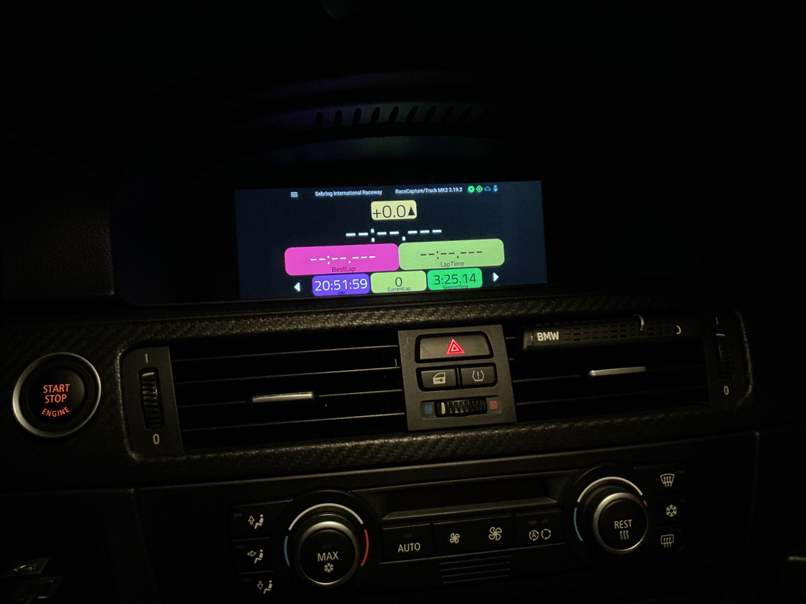
Mission accomplished! I'm really excited about this!
Unrelated question: should my CIC iDrive have a fan? I heard a constant whirring noise in the car tonight while testing this out. Or is it the CD drive spinning around? Obviously can't hear it if the car is running, just curious.
Tonight I was in the "Factory Mode" menu to update the boot logo, and I discovered you can do screen mirroring over USB!
Mission accomplished! I'm really excited about this!
Unrelated question: should my CIC iDrive have a fan? I heard a constant whirring noise in the car tonight while testing this out. Or is it the CD drive spinning around? Obviously can't hear it if the car is running, just curious.
tjames975 wroteYou've run into the issue I and many others in this thread have.One issue I noticed a few times now is that if I start in CarPlay, I don't get audio until I switch to the radio and back. I'm not sure what the trigger is for that state.
Around two years ago, I installed the unit in my e92 with factory CIC and no CD changer. Back then I didn't know anything about coding, so after the install I drove to some coding guy.
I remember he had issues reaching the module. He somehow managed to code the option and got it working.
After a couple of days I noticed there's a high pitched noise instead of sound when starting up the car in CarPlay mode. Only way to get the sound working is switching to radio and back to CarPlay.
After contacting the Mr12Volt support and waiting for a long time I got a reply and they replaced my device with a new one about a year ago.
Apart from my backup camera not working anymore the issue still persists.
So far no one found the cause of the problem.
But i'm almost certain now that installing the Mr12Volt device before coding the CIC will cause this sound issue.
I have always had this same problem.
What I do is flip the car back to radio before I shut it off. That way on the next restart the car starts in idrive audio, then I flip to the P2000 and everything works as expected.
I honestly suspect its a race condition with startup. The P2000 boots faster than idrive does, and MOST may not in the ready state yet.
What I do is flip the car back to radio before I shut it off. That way on the next restart the car starts in idrive audio, then I flip to the P2000 and everything works as expected.
I honestly suspect its a race condition with startup. The P2000 boots faster than idrive does, and MOST may not in the ready state yet.
Anybody had issue when going in reverse and back to carplay you get a green screen?
FEDE/E92 wroteYeah, unfortunately here too on a lot of cases. Going back into reverse and then in D again („slower“) usually resolves it but I’d like to get rid of it completely.Anybody had issue when going in reverse and back to carplay you get a green screen?
Anyone found a resolution for this?
Steggl wroteSeems to me that it might be reverse camera related and seeing that there are so many other issue with reverse camera too.Yeah, unfortunately here too on a lot of cases. Going back into reverse and then in D again („slower“) usually resolves it but I’d like to get rid of it completely.
Anyone found a resolution for this?
Hi
FWIW : For P2000-NBTMM, the Factory mode advanced menu password is 6682.
++
FWIW : For P2000-NBTMM, the Factory mode advanced menu password is 6682.
++
Hi all,
I have a e61 LCI 2008 with CCC.
Got my hands on a mr12volt p2000 CCCMD.
Didnt have a CDC from stock so went to the dealership to have it coded in:
VO change to add $672 and KMP3 to the CAS and LMA, sg_codieren to CAPPL CHOST CHATE CAUDI CTUNE. Overkill but better safe than sorry.
After that - I installed the mr12volt but CD1 wasn’t selectable. Infact the cd menu didn‘t change. CD1-6 wasnt displayed, not even greyed out. And if the both center console CD slots where empty, CD in the top header was greyed out. (Between FM AM and AUX.
No second header with CD1-6 as I expected.
So, back to the dealership, al the coding checked again and all found good.
But still no CD1-6 options displayed, with or without box installed.
Any suggestions?
Mr12volt support just advised to use bimmercode > expert mode > 3000HMI >CDMM_Changer_3 and change to MP3_cdc
But at least on my car that’s not available and doesn’t make sense on a car without cdc in the VO.
Cheers
I have a e61 LCI 2008 with CCC.
Got my hands on a mr12volt p2000 CCCMD.
Didnt have a CDC from stock so went to the dealership to have it coded in:
VO change to add $672 and KMP3 to the CAS and LMA, sg_codieren to CAPPL CHOST CHATE CAUDI CTUNE. Overkill but better safe than sorry.
After that - I installed the mr12volt but CD1 wasn’t selectable. Infact the cd menu didn‘t change. CD1-6 wasnt displayed, not even greyed out. And if the both center console CD slots where empty, CD in the top header was greyed out. (Between FM AM and AUX.
No second header with CD1-6 as I expected.
So, back to the dealership, al the coding checked again and all found good.
But still no CD1-6 options displayed, with or without box installed.
Any suggestions?
Mr12volt support just advised to use bimmercode > expert mode > 3000HMI >CDMM_Changer_3 and change to MP3_cdc
But at least on my car that’s not available and doesn’t make sense on a car without cdc in the VO.
Cheers
Sannie wroteYou have to do this before installing mr12volt. Assuming you have the newest unit that integrates factory microphone, you will need to uninstall mr12volt and then code the cd.Mr12volt support just advised to use bimmercode > expert mode > 3000HMI >CDMM_Changer_3 and change to MP3_cdc
Someone correct me if I'm wrong ...
Sannie wroteDid you install the CDC too or just code it? If either, did you install the CD changer wiring dongle in the trunk? I may be wrong but you don’t have to code in a changer.Hi all,
I have a e61 LCI 2008 with CCC.
Got my hands on a mr12volt p2000 CCCMD.
Didnt have a CDC from stock so went to the dealership to have it coded in:
VO change to add $672 and KMP3 to the CAS and LMA, sg_codieren to CAPPL CHOST CHATE CAUDI CTUNE. Overkill but better safe than sorry.
After that - I installed the mr12volt but CD1 wasn’t selectable. Infact the cd menu didn‘t change. CD1-6 wasnt displayed, not even greyed out. And if the both center console CD slots where empty, CD in the top header was greyed out. (Between FM AM and AUX.
No second header with CD1-6 as I expected.
So, back to the dealership, al the coding checked again and all found good.
But still no CD1-6 options displayed, with or without box installed.
Any suggestions?
Mr12volt support just advised to use bimmercode > expert mode > 3000HMI >CDMM_Changer_3 and change to MP3_cdc
But at least on my car that’s not available and doesn’t make sense on a car without cdc in the VO.
Cheers
I haven’t used bimmercode in a bit but I remember all options are available, you may be looking in the wrong module.
Tnx. No it’s all about the mr12volt carplaybox which is emulating a cd changer. So I got it coded just for that purpose. And coding done before installing.
Coding - installing - not working - deinstalling - coding checked by dealer, found ok - installing - not working.
As said coding was done by via NCS Expert. VO change as bimmercode (which I have as well) does not have these 3000HMI menu at all. In my e61, a CDC option is under 3010 > CCC_ECUS which is also aktiv, but that shouldn’t be sufficient I think.
So no physical CDC, just the coding so the CCC should display CD1-6 and the mr12volt is recognised.
Edit: the wiring is behind the CCC unit upward to the screen.
Coding - installing - not working - deinstalling - coding checked by dealer, found ok - installing - not working.
As said coding was done by via NCS Expert. VO change as bimmercode (which I have as well) does not have these 3000HMI menu at all. In my e61, a CDC option is under 3010 > CCC_ECUS which is also aktiv, but that shouldn’t be sufficient I think.
So no physical CDC, just the coding so the CCC should display CD1-6 and the mr12volt is recognised.
Edit: the wiring is behind the CCC unit upward to the screen.
Just to confirm, did you or did you not do the below:
Headunit -> Expert Mode -> 3000 HMI
Find CDMM_CHANGER_3 option and change it to mp3_cdc
CODE -> START CODING
Headunit -> Expert Mode -> 3000 HMI
Find CDMM_CHANGER_3 option and change it to mp3_cdc
CODE -> START CODING
Unable, this is not available in Bimmercode in my e61 LCI ccc.
Anyone in the bay area that can help with installing the rear camera? Let me know your cost please!
I would if I wasn't wrapped up in a home remodel. DM in a few weeks if you haven't gotten it done yet, I can help run the wires.
So with all the random glitchiness and issues people seem to have with this unit, I’m on the fence if it’s worth it.
Do the pros outweigh the cons / finicky nature of this product?
Obviously it would be amazing to have CarPlay on the screen, but not if I have to constantly fiddle with it and troubleshoot issues.
The install and coding is a non-issue for me. I just don’t want to be stuck with a headache. I installed the OEM BT unit, and that works fine, other than having to have my phone mounted for Google Maps.
Thoughts?
Do the pros outweigh the cons / finicky nature of this product?
Obviously it would be amazing to have CarPlay on the screen, but not if I have to constantly fiddle with it and troubleshoot issues.
The install and coding is a non-issue for me. I just don’t want to be stuck with a headache. I installed the OEM BT unit, and that works fine, other than having to have my phone mounted for Google Maps.
Thoughts?
Remember that only the people with issues are posting here. My guess is 75% of people who install have no issues.
Mine gave me some very odd voltage issues for about a month (Christmas light dash every 5 minutes, very annoying), then just completely went away and it's still working fine 3 years later.
If you have the "Individual" sound system in your M3, but it does not support payback through the USB in the console (I see you have an '11 so it should), then YES the mr12volt is worth it on audio quality alone. Playing music via AUX cable or Bluetooth results in noticeable drop in quality.
Would I do it again? Maybe. I think if I found a really clean, perfect phone mount that was discreet yet secure, and I could route USB from the console to the mount so the cable was hidden, I might just do that instead. BUT I have yet to find a mount like that; they all look clunky or require a special case. That said, I like the mr12volt enough that I'll be keeping it forever, and replacing it with a new one if it were to fail. Plus the reverse camera is nice.
Mine gave me some very odd voltage issues for about a month (Christmas light dash every 5 minutes, very annoying), then just completely went away and it's still working fine 3 years later.
If you have the "Individual" sound system in your M3, but it does not support payback through the USB in the console (I see you have an '11 so it should), then YES the mr12volt is worth it on audio quality alone. Playing music via AUX cable or Bluetooth results in noticeable drop in quality.
Would I do it again? Maybe. I think if I found a really clean, perfect phone mount that was discreet yet secure, and I could route USB from the console to the mount so the cable was hidden, I might just do that instead. BUT I have yet to find a mount like that; they all look clunky or require a special case. That said, I like the mr12volt enough that I'll be keeping it forever, and replacing it with a new one if it were to fail. Plus the reverse camera is nice.
lobuzz311 wroteSo with all the random glitchiness and issues people seem to have with this unit, I’m on the fence if it’s worth it.
Do the pros outweigh the cons / finicky nature of this product?
Obviously it would be amazing to have CarPlay on the screen, but not if I have to constantly fiddle with it and troubleshoot issues.
The install and coding is a non-issue for me. I just don’t want to be stuck with a headache. I installed the OEM BT unit, and that works fine, other than having to have my phone mounted for Google Maps.
Thoughts?
Thumbie wroteI have been using mine for the past 2-3 years now and at a high level, it does work very well. Would I recommend it? It’s hard to say and really depends on who you are.Remember that only the people with issues are posting here. My guess is 75% of people who install have no issues..
If you are someone who does car washes at home or works on your own car while listening to external bluetooth audio, then I seriously cannot recommend this unit. The carplay connection algorithm is insanely aggressive and will always attempt to connect and reconnect and reconnect…
Leave the car unlock? It’ll always try to pair until terminal 30g shuts down. Open the door? Terminal 30g turns back on and then the mr12volt will immediately reconnect, forcing a disconnect to whatever external bluetooth device was connected.
The support is almost nonexistent and me and a good bit of people on the facebook groups occasionally bring up the connection issue only to be told (by the admin) just lock your car and wait for it to go to sleep… Like no, just make a damn update to check the ign status on the CAN before attempting to connect, or literally just stop trying to reconnect after the user does a manual disconnect. I have oem carplay from my nbt evo in my M6 and the way bmw handles it is how the Mr12Volt should be. It’ll only start a connection once the ignition has been turned on and won’t try to keep the connection when the car is off (locked or unlocked)
Lastly, if you just drive your car and leave it then it’s a really nice fairly affordable and reliable solution. I personally just can’t wait to retrofit an nbt evo in my e90 and get rid of my Mr12Volt
KClemente wroteIn iOS 26, you can prevent your iPhone from switching audio to speakers or CarPlay by enabling the "Keep Audio with Headphones" feature. Navigate to Settings > General > AirPlay & Continuity and toggle on "Keep Audio with Headphones" to ensure your AirPods or Bluetooth headphones remain connected.I have been using mine for the past 2-3 years now and at a high level, it does work very well. Would I recommend it? It’s hard to say and really depends on who you are.
If you are someone who does car washes at home or works on your own car while listening to external bluetooth audio, then I seriously cannot recommend this unit. The carplay connection algorithm is insanely aggressive and will always attempt to connect and reconnect and reconnect…
Leave the car unlock? It’ll always try to pair until terminal 30g shuts down. Open the door? Terminal 30g turns back on and then the mr12volt will immediately reconnect, forcing a disconnect to whatever external bluetooth device was connected.
The support is almost nonexistent and me and a good bit of people on the facebook groups occasionally bring up the connection issue only to be told (by the admin) just lock your car and wait for it to go to sleep… Like no, just make a damn update to check the ign status on the CAN before attempting to connect, or literally just stop trying to reconnect after the user does a manual disconnect. I have oem carplay from my nbt evo in my M6 and the way bmw handles it is how the Mr12Volt should be. It’ll only start a connection once the ignition has been turned on and won’t try to keep the connection when the car is off (locked or unlocked)
Lastly, if you just drive your car and leave it then it’s a really nice fairly affordable and reliable solution. I personally just can’t wait to retrofit an nbt evo in my e90 and get rid of my Mr12Volt
You can also connect with the usb rather than wirelessly.
MyMR12volt has been extremely reliable since the latest iPhone 17 update patch. In the past, 5% of the time it would refuse to connect until rebooted. That has not happened in months. It connects more reliably than the ID6 factory CarPlay I have in my G01.
