

sannouni wroteSounds like you don't have E84 PDC module, that is a must, otherwise the CIC won't be able to understand MACRO_L6_PARKMENU without E84 PDC module. It's been already said by the main post that E84 PDC is a must and it had been repeated like 20 times in this threadI have a 2010 E60 5 series, with Factory PDC and CIC, and a combox retrofit. i got the TRSVC for Topview from an E70 LCI (2011), the cameras from the same car (3 cameras, 2 under mirrors, and 1 rear), i ran all the wiring according to the diagrams, the camera is not working, i got a replacement camera module thinking that it may be the problem, but i'm still getting the same result. i checked and rechecked my wiring, and tried to read the module using ISTA+ (the TRSVC comes up with 2 errors).
I cant "SG Codieren" the TRSVC because i cant add the $3AG (Reversing Camera) or $3AH (Reversing Camera And Top View) option to the E60 VO in NCSexpert, how do i solve that?
when i use NCSexpert to code CIC for MACRO_L6_PARKMENU Active, my PDC stops working.
any help and guidance is appreciated.
459.6KVIEWS
375REPLIES
134APPRECIATES
08-10-2026LAST POST
I have the back up camera working on my E89 Z4...Is there a way to adjust the green steerable grid lines with ProTools app?
Hi, I have 2013 BMW X5 E70 CIC with surround cameras and back camera. To add front camera, do i need to program any thing or just add the front camera. Thanks
Ramesh2020 wroteE70 has 2 different module, one with 3 fakra and one with 5. If you only have cameras on mirrors and rear then urs only has 3, so if you do get the 5 fakra there is no such a thing on e70 you can put a single front camera like f15/85s you need to add that additional 2 fakra to side of the bumpers.Hi, I have 2013 BMW X5 E70 CIC with surround cameras and back camera. To add front camera, do i need to program any thing or just add the front camera. Thanks
Thank you. I have cameras in front bumpers too for Bird eye view. I want to add front facing camera.
 SaNGRia Thank you so much for all your hard work on this retrofit!
I'm trying to make this work on my 2006 E60 M5 which I have already retrofit CIC and combox to. I have the trvsc out of my E70 and 2 different E84 PDC modules but cannot get them to code properly. When using an E84 SSD in NCSExpert I get a coding error when trying to read the PDC module. I can read all the other modules just fine, however.
**EDIT** I can't read good... I re-read your first post, grabbed the files for NCSExpert and was able to default code the PDC module. Now I just need to figure out the PDC wiring differences to clear the litany of errors I'm getting. End Edit
In INPA I can see that the PDC module is there and seems to be communicating fine. I was even able to program the module in WinKFP to change the VIN to mine. But I cannot read it with NCSExpert.
I even plugged the module into my buddy's E90 and had the same coding error. I figured it was a Kline vs Can issue, but the E90 is an LCI, so it should have been able to read the PDC module, right?
Any tips?
**EDIT 2.0**Ughhh. It seems I may need to convert to D-Can? My car is 04/06 which is still K-Line. Reading more in the thread it seems that I'd have to upgrade to DCan. Is it the E84 PDC module that won't play nice with K-Line? A replacement BCM (KGM) is cheap. The saga continues...
Thanks to SaNGRia for providing the post and kevinm03 for providing the camera cutting solution, I'm probably the first person in China to successfully complete the modification based on this post. Based on my practical experience, I'd like to add a point: as one reply in the post mentioned (though I forget who it was), you really can't apply glue before installing the camera into the latch. Otherwise, you can't insert the entire latch from its original position. Instead, use a separate method: insert the latch from the outside and the camera from the inside. Because I accidentally enlarged the hole to 20mm, the external gap was quite large, so I applied a ring of 704 silicone rubber for waterproofing. Thanks to the advantage of being in China, I only spent about $7 to buy a Chinese version of the latch, using an E70 TRSVC module and an E84 PDC module. The junction box hasn't been modified yet. The TRSVC harness was custom-made by a vendor for 150 RMB, about $20. The video cable is a US-made BELDEN-8761, and the other cables were DIY'd, so the total cost was very low. I'd also like to ask Mr. SaNGRia, I haven't replaced the junction box yet, and even after inserting the inpa file you provided, I couldn't find the calibration option. Do I need to replace the junction box first?
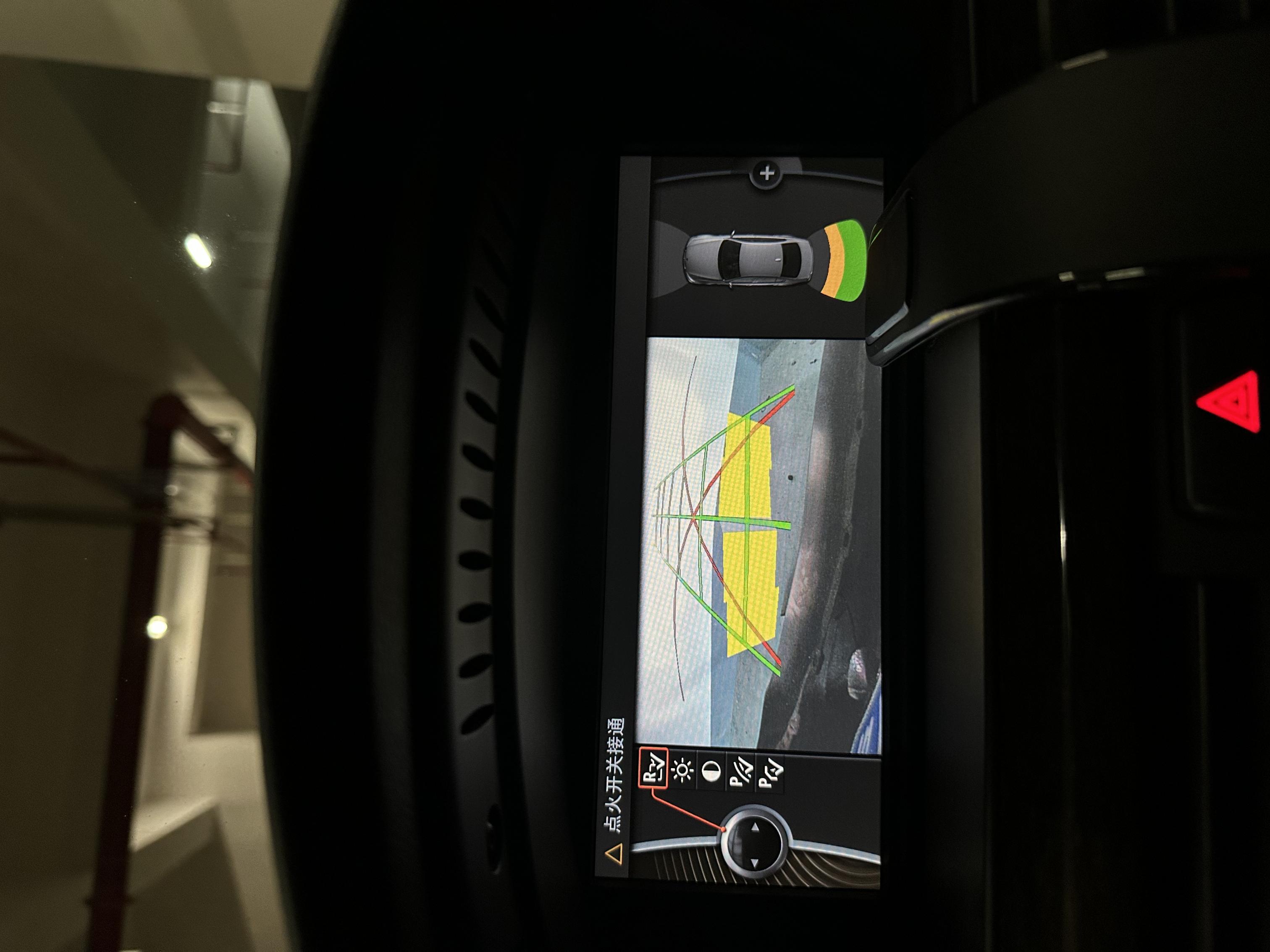
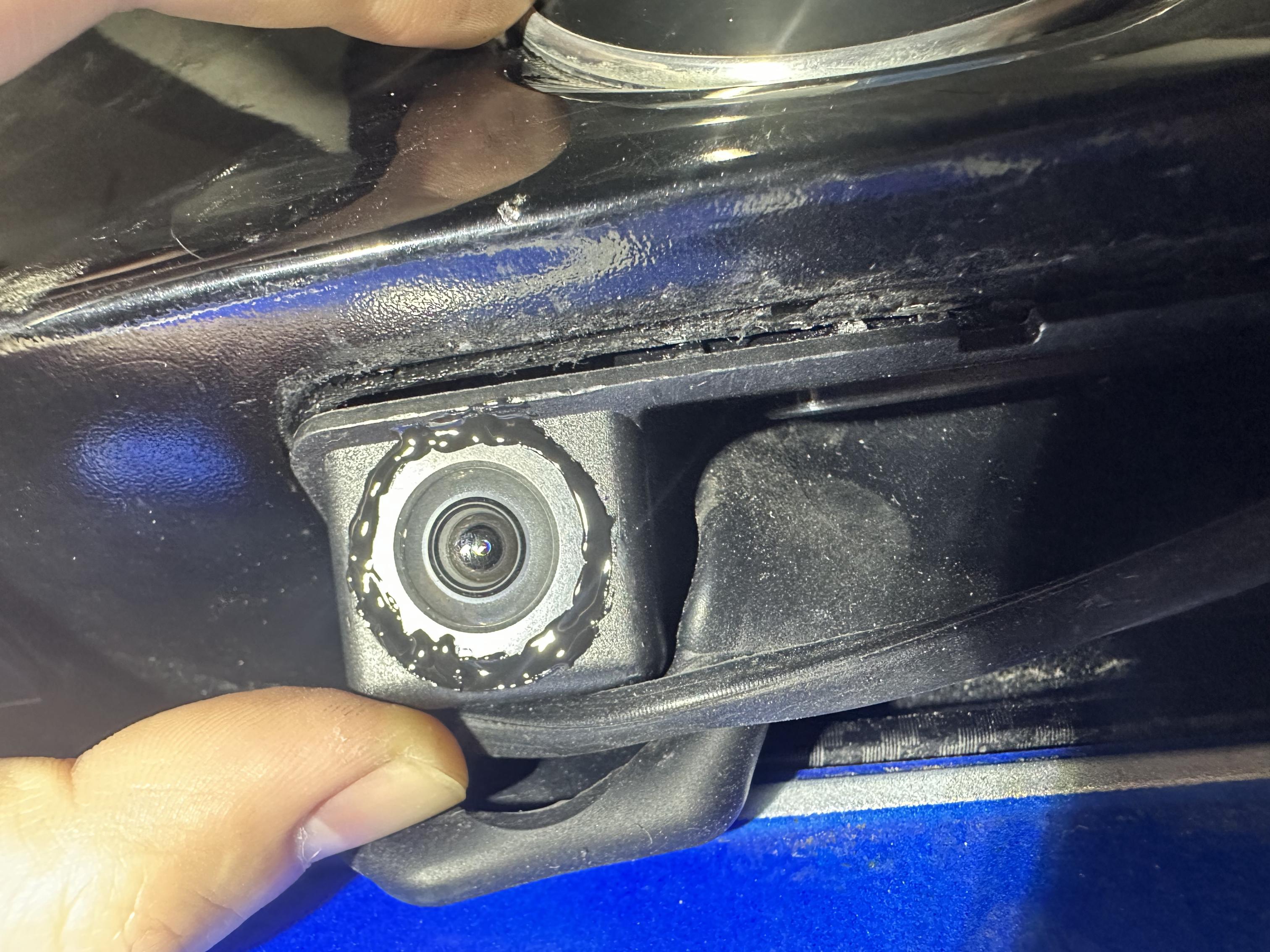
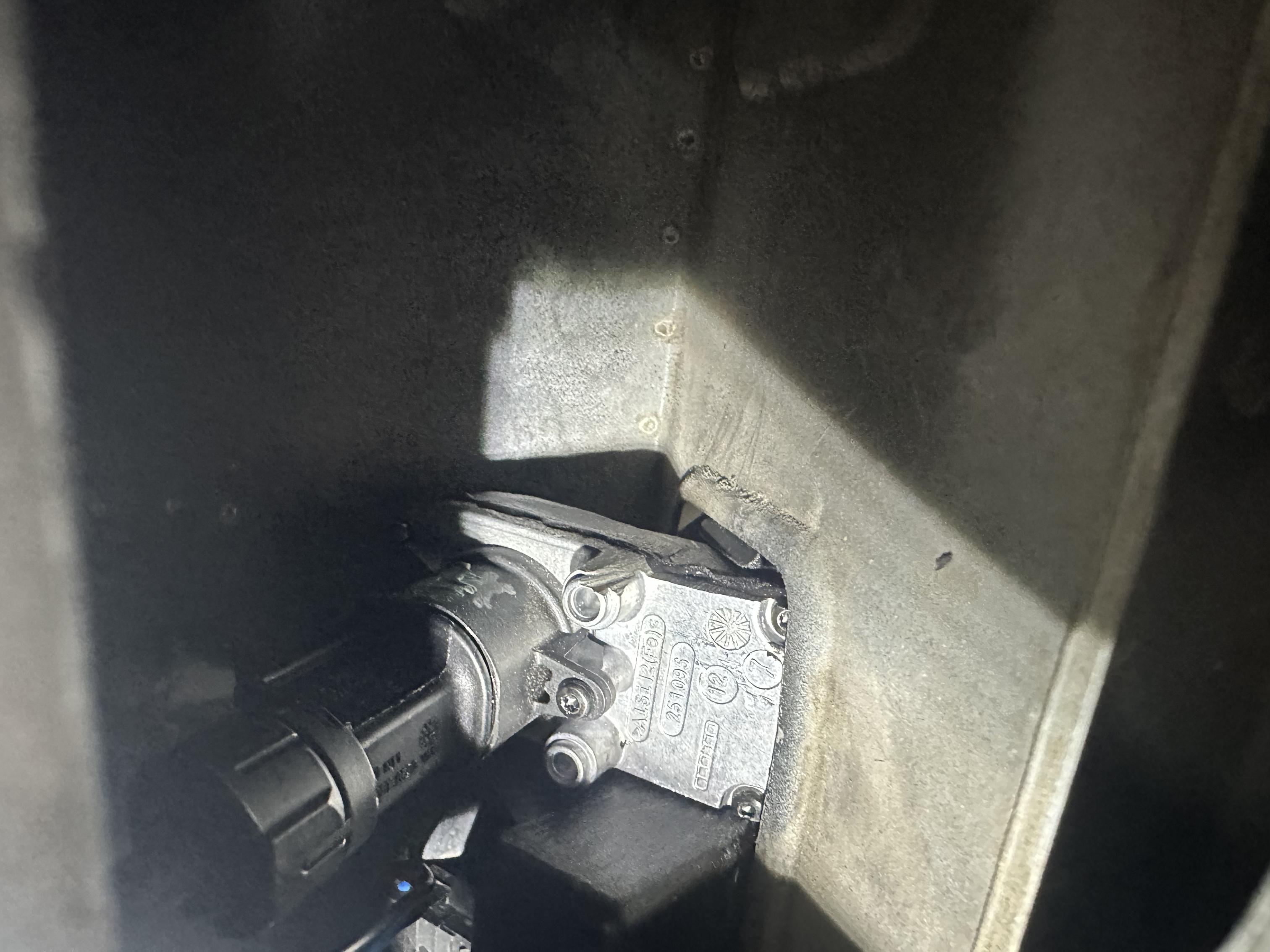
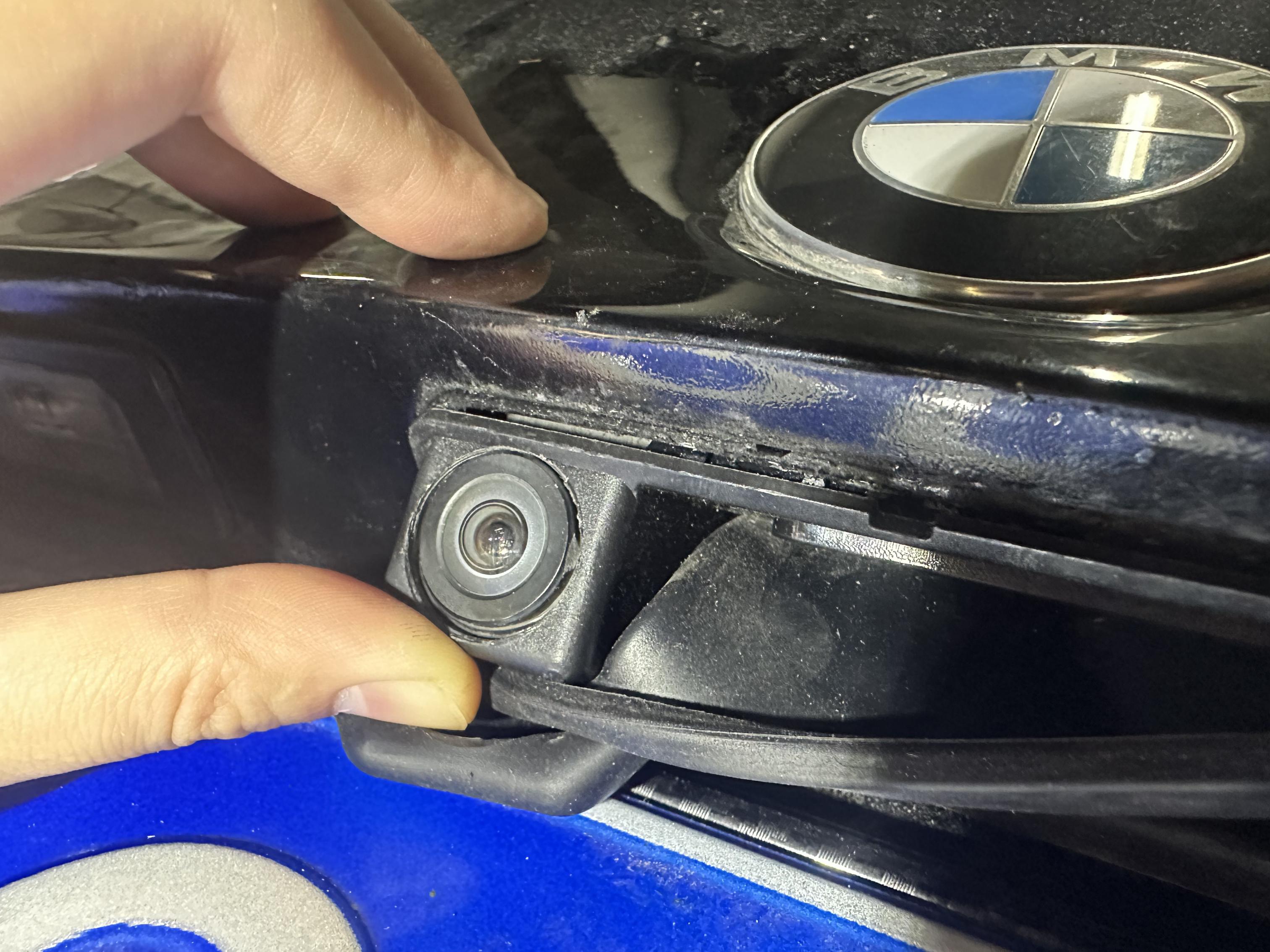
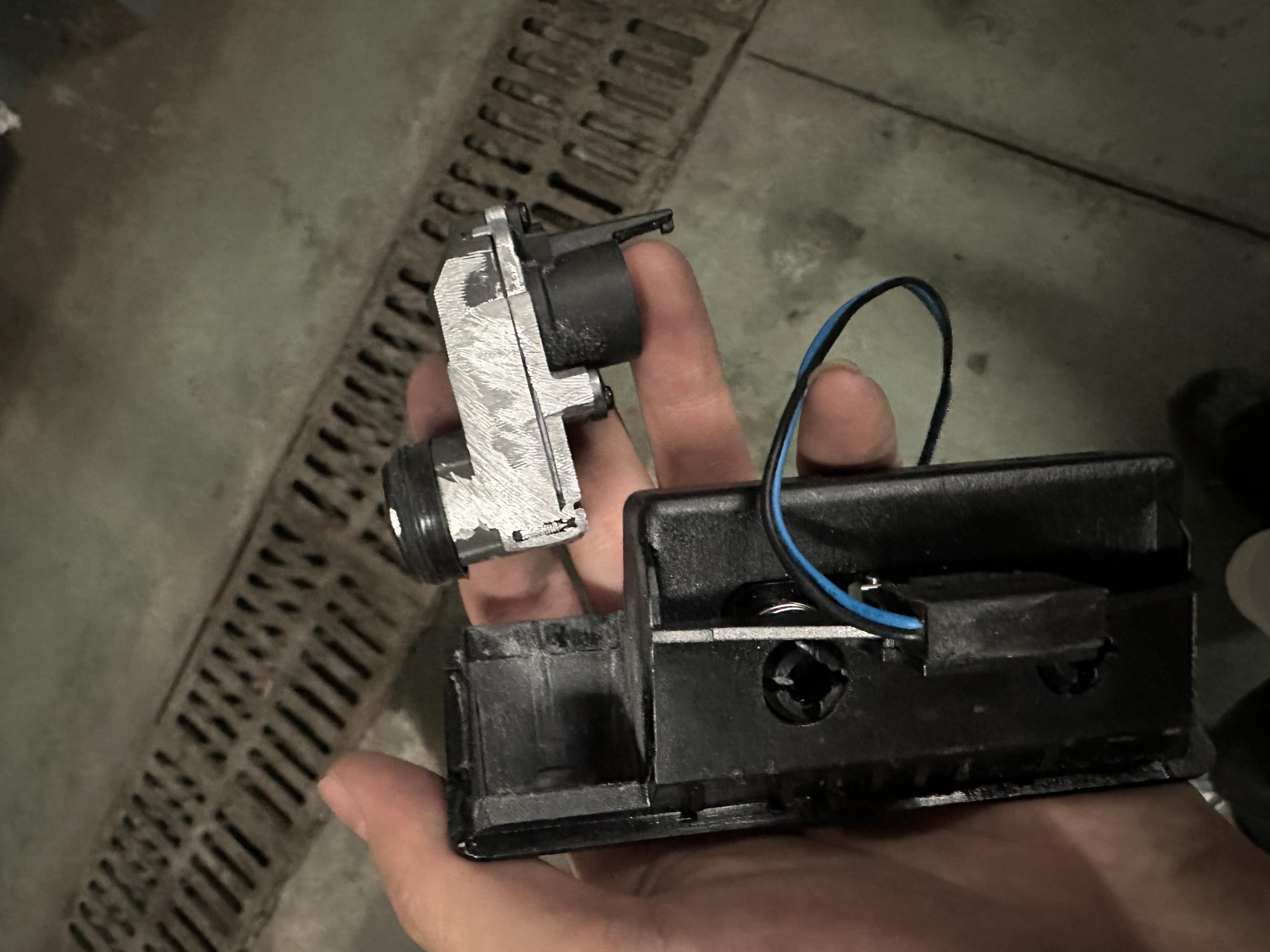
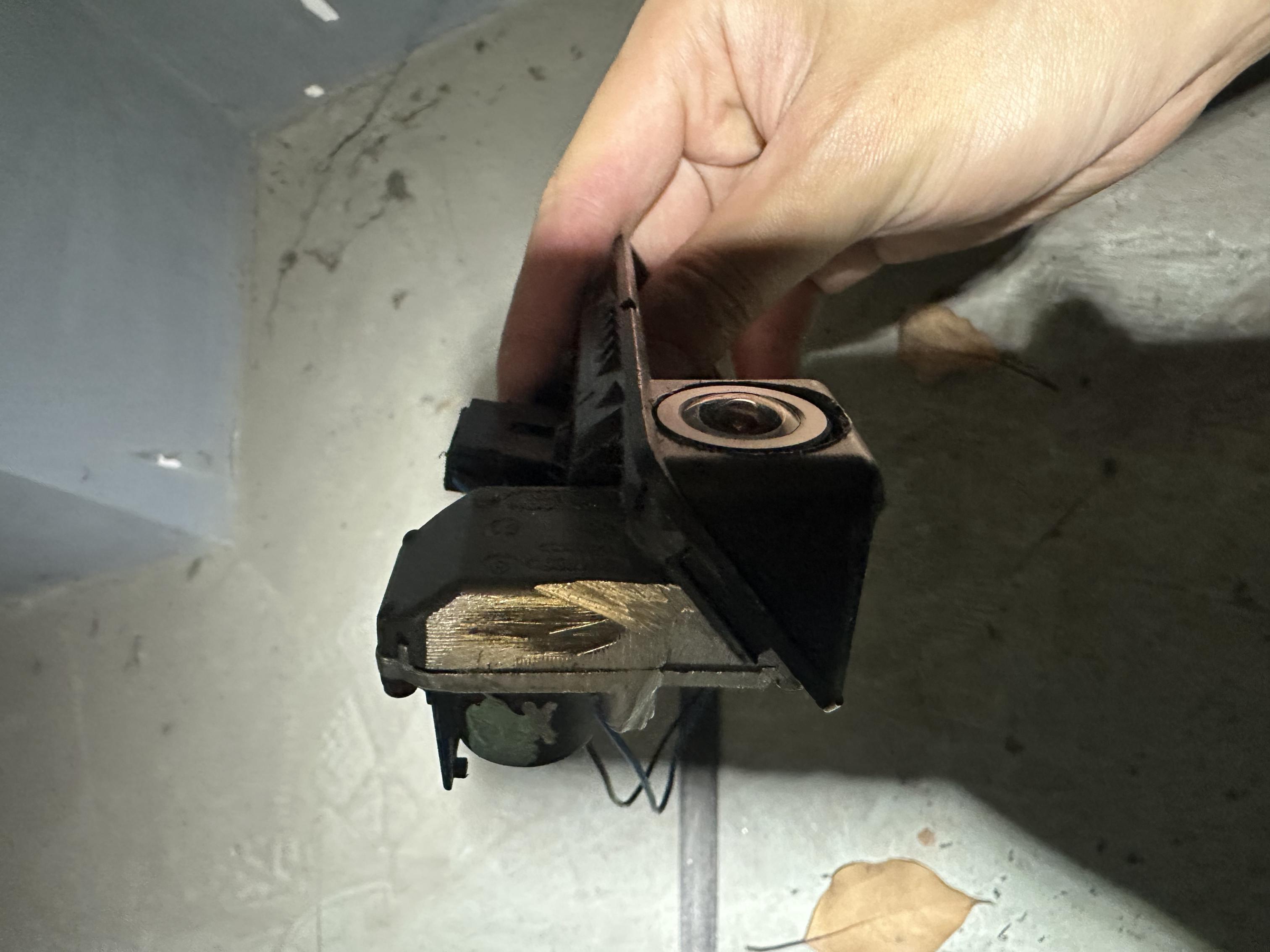
Mustang326 wroteGreat job. Congratulations. If you couldnt find the calibration option you either couldnt copy the files for inpa, or you don't have a communication with camera. Or can be both at the same time.Thanks to SaNGRia for providing the post and kevinm03 for providing the camera cutting solution, I'm probably the first person in China to successfully complete the modification based on this post. Based on my practical experience, I'd like to add a point: as one reply in the post mentioned (though I forget who it was), you really can't apply glue before installing the camera into the latch. Otherwise, you can't insert the entire latch from its original position. Instead, use a separate method: insert the latch from the outside and the camera from the inside. Because I accidentally enlarged the hole to 20mm, the external gap was quite large, so I applied a ring of 704 silicone rubber for waterproofing. Thanks to the advantage of being in China, I only spent about $7 to buy a Chinese version of the latch, using an E70 TRSVC module and an E84 PDC module. The junction box hasn't been modified yet. The TRSVC harness was custom-made by a vendor for 150 RMB, about $20. The video cable is a US-made BELDEN-8761, and the other cables were DIY'd, so the total cost was very low. I'd also like to ask Mr. SaNGRia, I haven't replaced the junction box yet, and even after inserting the inpa file you provided, I couldn't find the calibration option. Do I need to replace the junction box first?
First of all, I'd like to thank SaNGRia for the incredibly detailed retrofit guide. It must have taken a huge amount of time and effort to collect all the information and document everything so thoroughly. Really appreciate the work you've put into it!
However, I have one issue that I can't seem to solve, and I'm wondering if anyone has run into the same problem.
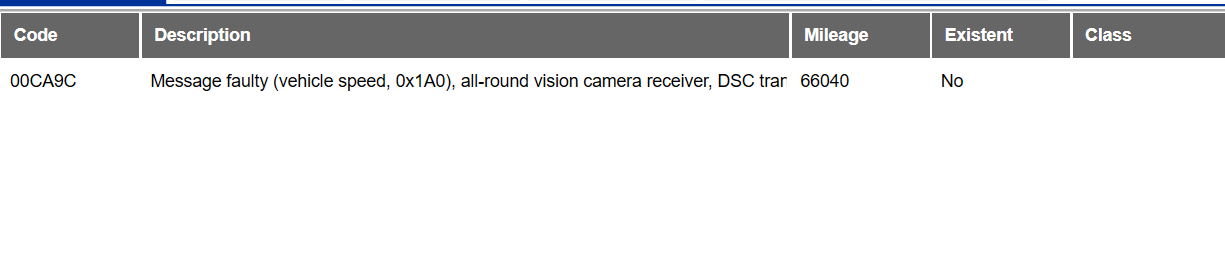
I'm getting fault code 00CA9C. I have already performed the camera calibration/training using INPA, and the camera appears to be working correctly. In real-world operation I can see the dynamic lines, and the steering wheel angle is being recognized properly (the lines move as expected when turning the wheel).
The strange thing is that the 00CA9C fault remains stored and cannot be cleared, even though the camera functions seem to be working normally.
Has anyone experienced this before or knows what could be causing the fault to persist despite a successful calibration?
Any suggestions would be greatly appreciated.
SaNGRia for the incredibly detailed retrofit guide. It must have taken a huge amount of time and effort to collect all the information and document everything so thoroughly. Really appreciate the work you've put into it!However, I have one issue that I can't seem to solve, and I'm wondering if anyone has run into the same problem.
I'm getting fault code 00CA9C. I have already performed the camera calibration/training using INPA, and the camera appears to be working correctly. In real-world operation I can see the dynamic lines, and the steering wheel angle is being recognized properly (the lines move as expected when turning the wheel).
The strange thing is that the 00CA9C fault remains stored and cannot be cleared, even though the camera functions seem to be working normally.
Has anyone experienced this before or knows what could be causing the fault to persist despite a successful calibration?
Any suggestions would be greatly appreciated.
So just curious, in post 1
"Which I did at the end, except BMW Live + Internet due to discontinued BMW Portal on E and F series. But I know a guy who is trying to MIT Attack to G series server to gain access on E and F series but let's see."
Did this ever come along?
And just wondering if you (Sangria) coded your CIC to E93 so you get the correct car graphic on the PDC menu?
"Which I did at the end, except BMW Live + Internet due to discontinued BMW Portal on E and F series. But I know a guy who is trying to MIT Attack to G series server to gain access on E and F series but let's see."
Did this ever come along?
And just wondering if you (Sangria) coded your CIC to E93 so you get the correct car graphic on the PDC menu?
SaNGRia wroteHello friends, I’ve been gathering information and parts for this retrofit for a long time. I have collected the PDC from a BMW E84, and the TRSVC module along with the camera from an E70, as well as the complete wiring harness. I have already run the camera wiring through the trunk lid and connected the TRSVC module. I tapped into the power and CAN bus connections from the PDC module and added the VO (Vehicle Order) code for the camera. However, when I open NCS Expert, it won't let me perform 'SG_CODIEREN' on it. Please help meHello guys,
Long story short I have done my CCC to CIC retrofit and my journey started right afterI wanted to have Front + Rear PDC + iPhone Videos + Reverse Camera + iPhone Apps, BMW Live + Internet Everything that you can imagine its possible to have on CIC Professional.
Which I did at the end, except BMW Live + Internet due to discontinued BMW Portal on E and F series. But I know a guy who is trying to MIT Attack to G series server to gain access on E and F series but let's see.
So today I would like to share the first DIY guide of OEM Reverse Camera retrofit on E9x series. I have gathered a lot of information online but there was no DIY topic on this application. So I would like to share all the information here so can be helpful for anyone who wants to do it OEM way.
Since the E9x series getting older, the parts are very cheap. Also it is very easy to do if you have PDC (Even only rear one).
The Required Items :
1- E84 X1 PDC (Must) P/N : 9252636
2- E70, E71, E84 TRSVC Module / Camera Module (Search On Ebay)
3- TRSVC Camera Retrofit Cable : 61122183660 (I used this seller several times he is great. Just tell him to use faster shipment. It will cost $30 more but worth it. I have waited like 40 days with regular shipment due to Covid19.
5- Chinese Reverse Camera Handle (If you do not want to cut your trunk)
6- F10 Reverse Camera (9240351) Ebay IT
7 - Edited PDC file for NCSExpert to code your e84 PDC on E9x. You will not able to read or code your PDC without this files, and if you can not default code it you will not able to activate your Parking Menu. (I attached the files as .txt just download it and change to .rar so you can see the files. Read the ReadMe file so you know where to put this files) Credited : Andy and Superwofy
I have totally paid $170 . Got good deals on Ebay. pacific-motors is a good seller as well.
Let me explain what I have done to accomplish this project.
I already had e9x Front + Rear PDC retrofit with Chinese Emulator and was working perfectly fine. Since I am OEM maniac I decided to do OEM application. Not just that but additionally gain Parking Lines + Obstacles + Unnecessary Towing Hitch Feature to be manageable on CIC screen. And I believe nothing looks better than OEM.
Having Chinese Emulator and PDC made my job a lot easier because my VO list already updated with $3AG (Reverse Camera) and $508 (Front and Rear PDC), If you have $507 (Only rear PDC Keep it as is, as soon as you default code the e84 Front + Rear PDC, it will cancel the Front part and will work like your Rear e9x PDC without an issue with the OEM camera module)
And my CIC was coded like this :
MACRO_PDC
aktiv
MACRO_REARVIEW
aktiv
RVC_CIC
wert_21 (FBAS1 Pin 18+ Pin 28- Pin 27 Shield)
MACRO_L6_PARKMENU
aktiv
PDC_DIRECTION
vertikal
For the Trailer Hitch Zoom Function, Code the MACRO_TRAILER_COUPLING aktiv on CIC . Now you will see Trailer Hitch icon on the parking menu. (I like to have it all)
Additionally If you have Front and Rear PDC, The Front PDC beeps slower than Rear PDC sensors. If you want to match the beep sounds in the same rate do a coding on PDC (Thanks to my very good friend Chris (cbozzz) :
FREQUENZ_TONGEBER_HINTEN
wert_01
FREQUENZ_TONGEBER_VORNE (Front)
wert_01 (This usually set for wert_02)
Because I have already done this As soon as I installed the e84 PDC (Default Coded) + OEM wiring harness + e84 TRSVC Everything worked without doing anything.
Important points are :
CIC Professional OEM Camera installation requires FBAS1 pins with RVC wert_21. It is mentioned on OEM instruction which I did. (Chinese one was Pin21-24 And RVC wert_23)
If you buy a different Camera Retrofit cable, regardless of the different colors on the cables, Follow the diagram above to connect your FBAS pins correct places using this diagram. Some cables has Yellow and White in different place. But as you can see on diagram Pin 2 of the TRSVC goes to Pin 18 of the FBAS. and so on...
After you have successfully connected the FBAS cables, run this cable all the way to the trunk. In my case because I own E93, the PDC is behind the rear seat. So I run the cable there.
Then make a Y cable from PDC power and Ground and attach that to TRSVC cables Positive (Pin 7) and Negative (Pin 1).
Then use the Can cables on PDC module. Attach the TRSVC CANBUS cables tightly using the M connector that comes with the kit. And you are done with the TRSVC cable installation.
For people who owns e90 and e92 use combox bracket on the trunk to install the TRSVC other side of the bracket and install it back its place.
My case was little different due to e93 design. The HSD cable that goes to trunk handle was not long enough to run the cable all the way to the combox area. So I put it next to the tire inflator for now. I will probably cut the HSD cable and extend with a video cable later on to install under the combox. (Done it after couple days after with this cable)
Trunk Handle Installation :
I have seen couple of OEM retrofits but they were cutting the trunk to fit F series trunk handle and I was little upset with that since I don't like to cut my car for even OEM retrofit. I decided to do something different which worked amazing.
I already had my Chinese handle from my Chinese retrofit. I have remove the camera that was on the handle. And tried to install the OEM camera on that tiny place which did not work at the first time
Then I did this :


Just a little note here. After installing the camera, please use a clear silicone (waterproof) and put all around the camera, just make sure it will not over run from the 19mm camera hole. And then let it sit for a day. And use the silicone cover that comes with the Chinese handle to hide your imperfections. Thats it.
The tricky part is because the oem camera has a humangous back part, it is really not too easy to install the handle like Chinese one. So you need to first make sure HSD cable comes out like this :
The position of the HSD cable really important. If that cable comes from the bottom of the trunk it will not clear and wont fit. There is tiny square hole in the trunk and you have to feed this cable from there. I did not take a picture of this hole but you wont miss it. After the cable properly installed attach to the camera. Also do not forget to attach trunk handle power cable.
And other tricky part is do not try to install the handle straight like you would do on Chinese handle. Put the handle 90 degree where the camera part down and the other side is up. Insert the camera's back first then start tilting. You will start feeling at this point. I suggest you to use your other hand from the inside of the trunk. Reach to the Hsd connector with your fingers to adjust the camera while you are adjusting the handle with your other hand. I was able to do it in 10 min. And it fit perfectly fine. But wasn't too easy. When you also want to remove the handle you need to use your other hand to grab HSD connector from inside. But I don't think this camera will fail anytime soon. They are top notch quality comparing to Chinese ones.
Another Trick will be installing the HSD cable to your trunk. Many people cut their cable to fit their HSD cable at this narrow rubber tube. I did something better so no need to cut your cable.


The oem wiring harness comes with Ground Point in the middle . I bent this part and tape it before running in to the tube.
Once you have done installing the PDC and TRSVC properly, grab your laptop. Open the NCSExpert. Do not forget to copy files that I attached here. After copying this files in place Turn on your ignition but no need to start the car. (PDC module only works when ignition is on, because of the Y cable TRSVC also turns on when the ignition is on) read the PDC file and default code it. And switch your gear to reverse. You should be all set.
And here is the pictures :


For the E93 series like me please make sure your HSD cable runs correctly. I made couple of tests before install in place (I had experienced from Chinese Kit Thank God. And the Original cable was too tight so causes an issue at the very first time. Then I corrected it) :
The HSD Cable that comes with the kit originally made for X1 vehicles and fits good for E90/92. But it is not long enough for the E93. So You need to get specifically this cable to extend the HSD cable by soldering 4 wire with the shield.
NOTE : At the end I had a very strange issue, My TRSVC module can not communicate neither on Tool32 nor ISTA. Ista shows the module with 2 error stored, but when I click " Call Up Funtions" ECU can not communicate. Only INPA UIF shows STVR/TEBF Job Status OKAY with the part number 9291385 which is X1 TRSVC. Other than that It works without any issue. I might do e84 SSD file on NCSExpert to see if I can default code it but no need to do anything and not effecting the functionality.
INPA UIF
UPDATE :
I have found the issue why the TRSVC can not be recognized with my system. I have JBBF H3 Junction Box and I need to upgrade this to minimum JBE 3R H2/H3/M in order to communicate with TRSVC :
jbbf81 K-line (cars older than march 2007) also knows as JBE
jbbf70 D-can (cars newer than march 2007) also knows as JBE2
jbbfr3 D-can (cars newer than march 2007) also knows as JBE3
Versions of JBE:
There are a few versions available
L1 (low range type, low range version)
L2 (low range type, medium range version)
H1 (high range type, low range version)
H2 (high range type, medium range version)
H3 (high range type, high range version -> used in E91 and E93)
H4 (high range type, very high range version)
M (Master Version, Supports ALL)
That means New Project is on the way if it is just a PnP upgrade.
Here is the JBE I ordered. It is the "M" version which means Master. It has all connection types listed above :
FINAL :
Alright guys i have done the JBE3 Swap today. Everything working like a charm and TRSVC getting recognized. The amazing part was before i have flashed the JBE3 with my VIN, i checked the INPA UIF to see how many module was disconnected with the swap process, Oh well, all was connected and saying OKAY. It was a 1:1 Swap and the module came from e90 335i.
I was so pleased with that but i went ahead and flashed with my vin and defaulT coded on NCSExpert.
Since i removed my glovebox i also went ahead and installed the TRSVC positive cable to Pin10 with 5amp fuse (K15 ignition on).
I just done the calibration on ISTA and drove on highway and came back. Calibration done properly.
I now just need to find a way to default code the TRSVC (prob with ICOM). And thats all
NOTE : If you have bimmergeek pro cable, no need ICOM, it can read and code the TRSVC.


For INPA Calibration Add the files in INPA.rar to EC-APPS/INPA/SGDAT and also this :
C: / EC-APPS / INPA / CDGDAT /
edit the appropriate file for the vehicle series
1 series = E87.GER / ENG,
3 series = E90.GER / ENG.
GER if INPA is in German
ENG if INPA is in English.
Open it with a text editor and add the entry
"ENTRY= RFK_70, Rückfahrkamera-System," to "KAROSSERIE", then you can select and calibrate the camera in INPA under your vehicle class.
For the English file it's called "RFK_70, Rear Driving Camera System RFK_70,"
Save and Calibrate (Thanks to Dubstar)
RKF files in German so follow the guide on INPA :
Press F6
Then F7
If you see this That means Learning Completed (Anlernen erfolgreich)
Now go and drive alittle then come back park the car and let it sleep. Wake her up to see how she is behaving after this butt operation! You are all done!
(I will be adding more members name later. I have got alot of information from everywhere)


My car is bmw e91 11\2011 in full package
bmwretrocode wroteDid you update the files which is attached on the post?Hello friends, I’ve been gathering information and parts for this retrofit for a long time. I have collected the PDC from a BMW E84, and the TRSVC module along with the camera from an E70, as well as the complete wiring harness. I have already run the camera wiring through the trunk lid and connected the TRSVC module. I tapped into the power and CAN bus connections from the PDC module and added the VO (Vehicle Order) code for the camera. However, when I open NCS Expert, it won't let me perform 'SG_CODIEREN' on it. Please help me
My car is bmw e91 11\2011 in full package
No, because i cant convert it from .txt to .rar
How to do it, or can you send me on mail
milic.miljan98@gmail.com that files, thanks again for help
How to do it, or can you send me on mail
milic.miljan98@gmail.com that files, thanks again for help
bmwretrocode wroteIf you do this, you will see the extention and can be edit to rarNo, because i cant convert it from .txt to .rar
How to do it, or can you send me on mail
milic.miljan98@gmail.com that files, thanks again for help
Okay, I already did that, but I'm still having the issue that I can't perform SG Codieren on the TRSVC module. Could this be because I still haven't connected the TRSVC to the CIC?
I got the reverse camera menu, but what I'm wondering is whether there's a chance the problem is simply that I haven't connected everything yet.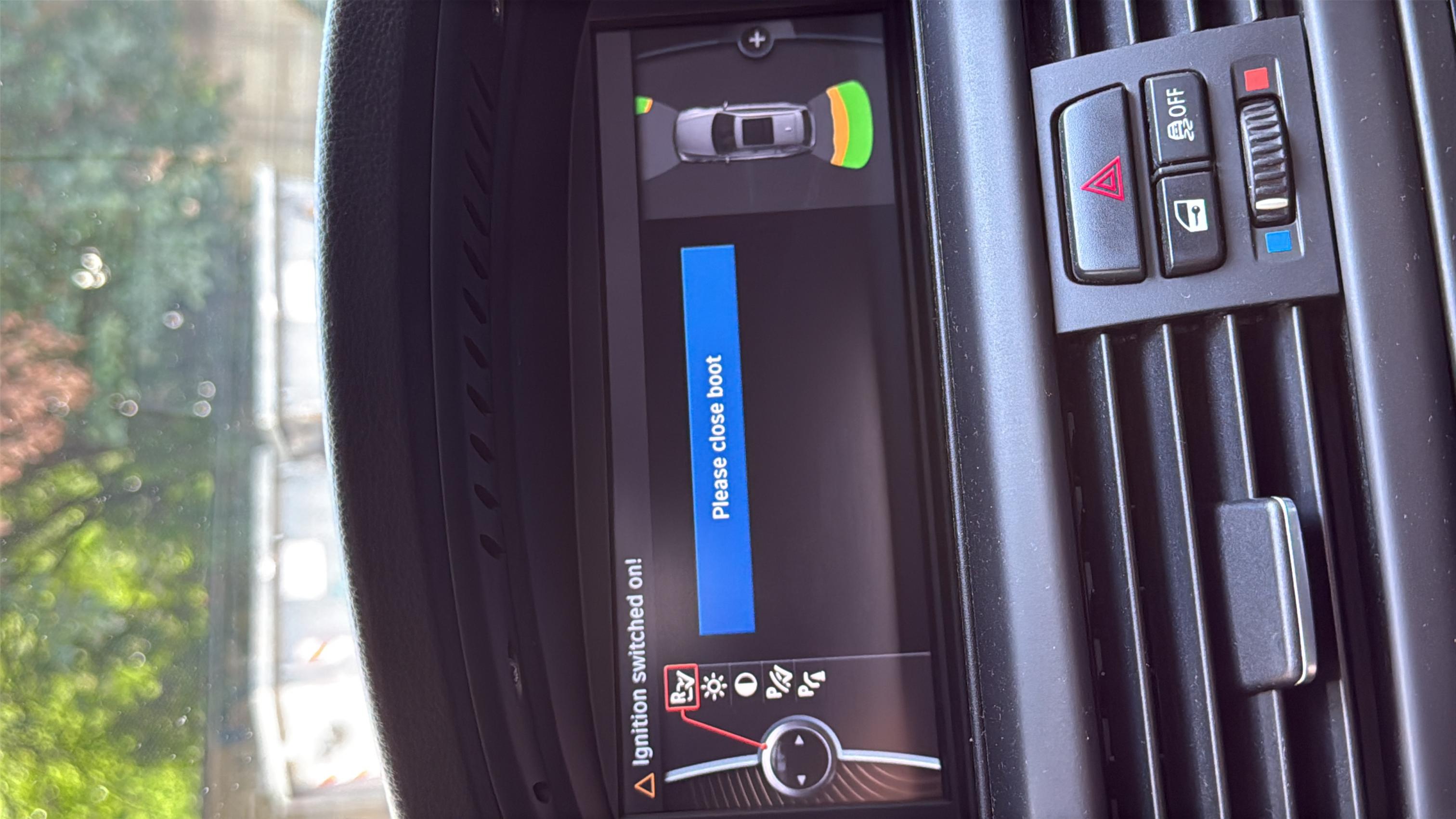
I got the reverse camera menu, but what I'm wondering is whether there's a chance the problem is simply that I haven't connected everything yet.
I have never seen anyone trying to code modules separately before everything is connected. So yeah it might be several issues
1- Connection issue
2- Cable issue (TRSVC can only be coded with ICOM or Bimmergeek or updated eidabaslib cable.
3- Module issue
4- Setup issue (like files are not in correct place)
1- Connection issue
2- Cable issue (TRSVC can only be coded with ICOM or Bimmergeek or updated eidabaslib cable.
3- Module issue
4- Setup issue (like files are not in correct place)
Julz90 wroteHey man, hope you’re still active here. I also have the CarGrade NBT adapter but with EVO ID6. I wanted to ask, how did you manage to retrofit trsvc with it? Is trsvc connected to the same can as the car? For example the same as PDC or maybe after the adapter on CAN2? Also did you remove the wires for the camera that CarGrade provides and just plugged FBAS straight to NBT? Thanks.Thanks again SaNGRia for the help!
It works with the custom retrofit adapter without problems.
So my nbt + rear view camera retrofit is successful.
Maybe
SaNGRia you will know ?
I connected everything, but my pins 18, 27, and 28 were already in use, so I used pins 21, 23, and 24 instead. Now I'm getting the issue shown in the image below, even when the camera is disconnected.
Could the problem be with the wiring or the code?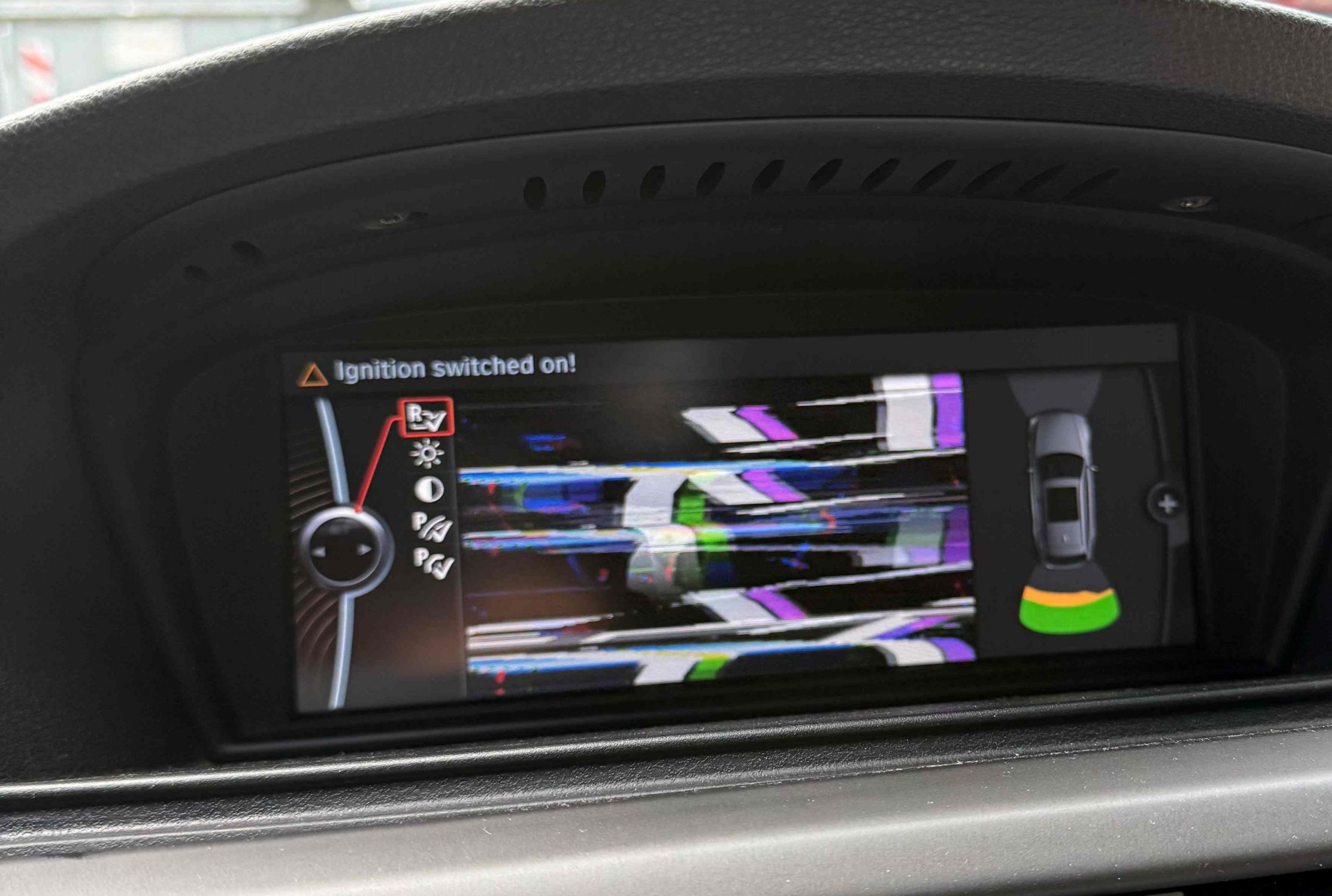
bmwretrocode wroteFBAS3.Could the problem be with the wiring or the code?
+21
-24
23 Shield
wert_23
BlackL1NE wroteOn NBT Evo, E84 PDC connects to regular canbus but TRSVC has to be on can2 to show the live footage on nbt.Hey man, hope you’re still active here. I also have the CarGrade NBT adapter but with EVO ID6. I wanted to ask, how did you manage to retrofit trsvc with it? Is trsvc connected to the same can as the car? For example the same as PDC or maybe after the adapter on CAN2? Also did you remove the wires for the camera that CarGrade provides and just plugged FBAS straight to NBT? Thanks.
Maybe
Reverse signal travels with regular canbus to PDC where broadcast command activated, then TRSVC shows the camera on HU
Hi Sangria!
After selling my E90, I bought an E60 M5, and I’ve now been the owner of this car for 3 years. It has pretty much all the options, but unfortunately, it doesn’t have a rear-view camera like my E90 did, so I’m thinking about retrofitting one because I’m getting bored without it. 😄
My question is: apart from the TRSVC module from an E70 and the wiring harness for the module itself, do I also need to replace the PDC module, like I had to do with the E90?
I already know that I’ll need to get the F10 camera and a handle from AliExpress. Is there any difference in the pinout between the E90 and E60 when wiring the TRSVC module to the CIC navigation unit? And is there anything else specific I should be aware of during the retrofit?
After selling my E90, I bought an E60 M5, and I’ve now been the owner of this car for 3 years. It has pretty much all the options, but unfortunately, it doesn’t have a rear-view camera like my E90 did, so I’m thinking about retrofitting one because I’m getting bored without it. 😄
My question is: apart from the TRSVC module from an E70 and the wiring harness for the module itself, do I also need to replace the PDC module, like I had to do with the E90?
I already know that I’ll need to get the F10 camera and a handle from AliExpress. Is there any difference in the pinout between the E90 and E60 when wiring the TRSVC module to the CIC navigation unit? And is there anything else specific I should be aware of during the retrofit?
